When a high-performance workstation laptop begins to lose battery life, the replacement process is rarely as simple as searching for the laptop model and buying the first battery that appears. This is especially true for the Dell Precision 7530, 7540, 7730, and 7740 series, where different battery configurations may exist within the same model family.
If your original battery is the Dell NYFJH, choosing a correct replacement means checking more than just the laptop name. You should confirm the battery part number, watt-hour rating, voltage class, cell count, compatible model family, and physical battery shape. In this guide, we will break down the key technical details of the 97Wh Dell NYFJH battery, explain the compatible part number family, and show what buyers should verify before placing an order.
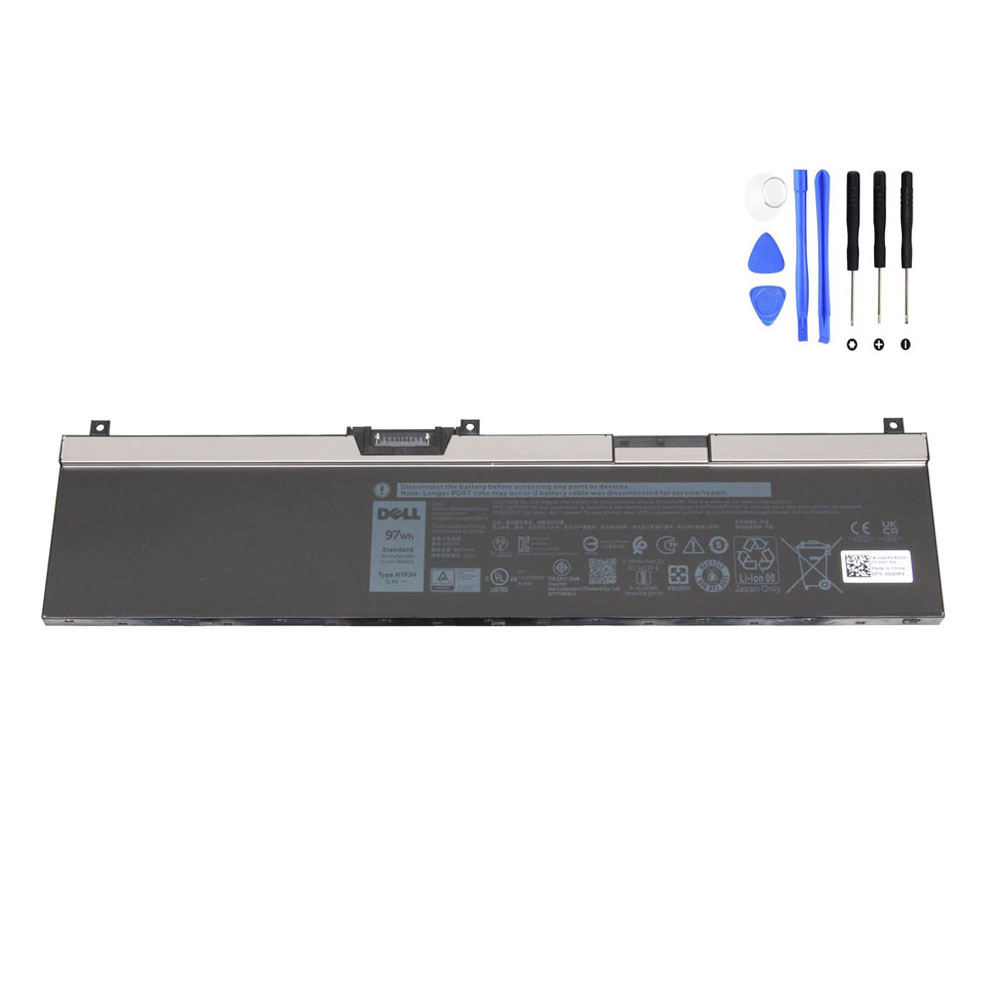
View the 97Wh Dell NYFJH Battery Product Page
What Is the Dell NYFJH Battery?
The Dell NYFJH is an internal rechargeable replacement battery used in selected Dell Precision mobile workstation laptops. It belongs to the larger-capacity battery class used in this workstation generation and is designed for users who need reliable unplugged runtime on systems built for demanding workloads such as engineering software, 3D applications, simulation, field diagnostics, design work, and content creation.
According to your product page, the battery is specified as follows:
- Battery model: Dell NYFJH
- Capacity: 8070mAh / 97Wh
- Voltage: 11.5V
- Cells: 6-cell
- Condition: brand new replacement battery
These details place it firmly in the high-capacity internal battery category for the supported Dell Precision systems.
Compatible Dell Laptop Models
Your product page lists the 97Wh Dell NYFJH battery as compatible with the following laptop model series:
- Dell Precision 15 7530
- Dell Precision 15 7540
- Dell Precision 17 7730
- Dell Precision 17 7740
These are workstation-class systems, not basic consumer laptops. That matters because workstation users often place heavier demands on the battery through CPU-intensive and GPU-intensive tasks, which makes battery health and replacement quality especially important.
At the same time, buyers should remember an important rule: model compatibility alone is not enough. Some laptops in this series may use a different battery version, so the correct replacement should always be confirmed by checking the original battery label and physical layout.
Compatible Part Numbers and Related Battery Codes
One of the best ways to identify the correct replacement battery is by matching the original battery’s part number or related compatible references. This is particularly useful because some buyers search by the number printed on the battery label, while others search by a Dell DP/N or a seller’s compatible code list.
Your product page lists the following compatible or associated part numbers for this battery family:
- 0CJ18V
- 0DP9KT
- 0FY2VW
- 0GW0K9
- 0NYFJH
- 0VRX0J
- 0WMRC
- 451-BCFS
- 451-BCGI
- 7M0T6
- CJ18V
- DP9KT
- FY2VW
- GW0K9
- NYFJH
- VRX0J
- WMRC
This list is valuable because it helps buyers connect different search patterns to the same battery family. For example, one user may search for NYFJH battery, while another may search for GW0K9 battery or 451-BCGI battery. When the battery family, specifications, and laptop series align, these different search paths may still point to the same replacement class.
Why 97Wh Matters
The 97Wh rating is one of the most important identifiers of this battery. It tells you that the battery belongs to the larger-capacity option used in this workstation generation. In practical terms, that larger capacity matters because mobile workstations consume more power than ordinary office laptops.
Users running CAD tools, rendering jobs, simulation environments, development workloads, virtual machines, or intensive spreadsheets often need better unplugged runtime than a smaller battery can provide. A correctly matched 97Wh battery helps restore the mobility that these systems lose once the original pack begins to age.
For many professional users, battery replacement is not only about making the laptop turn on again. It is also about restoring practical daily use in real work situations such as:
- Meetings away from a power outlet
- On-site engineering visits
- Field service work
- Travel between offices or client locations
- Mobile design, testing, and data review sessions
Voltage and Cell Count: Why They Should Not Be Ignored
Some buyers focus only on the laptop model and the Wh rating, but voltage and cell count also matter. Your product page lists the NYFJH battery as 11.5V and 6-cell, which is consistent with the high-capacity battery family used in these Dell Precision systems.
When checking a replacement battery, the goal is not to chase small wording differences between listings. The goal is to stay within the correct designed battery family for the laptop. That means the battery should match the original in:
- Part number family
- Wh class
- Voltage class
- Cell configuration
- Physical structure
This is why professional buyers, technicians, and careful end users always verify the battery label before ordering.
Why Buyers Still Order the Wrong Battery
Even when the laptop model is correct, battery ordering mistakes still happen for several reasons:
- The same laptop series may support more than one battery version
- Online marketplace titles are often too broad
- Some listings mention compatible laptops but not the exact battery class
- Buyers skip checking the battery label inside the laptop
- Users compare only the outside appearance of the laptop instead of the battery itself
For the Dell Precision 7530 / 7540 / 7730 / 7740 family, this problem is especially common because the same model name can be associated with different battery capacities depending on configuration.
How to Verify That NYFJH Is the Correct Replacement
Before ordering a replacement, go through the following identification steps:
- Open the bottom cover if there is any uncertainty.
- Read the original battery label and look for NYFJH or one of the related compatible part numbers.
- Check the capacity and confirm that the old battery is in the 97Wh family.
- Confirm the voltage class, typically around 11.4V to 11.5V for this battery category.
- Compare the shape and connector location with the replacement battery image.
- Verify the supported laptop series before purchase.
If these points align, you can move forward with far more confidence than if you rely on laptop model name alone.
Who Should Pay Extra Attention to Part Number Matching?
Part number matching is especially important for:
- Repair shops handling multiple Dell workstation models
- IT departments ordering replacement parts in batches
- Resellers sourcing inventory for refurbishing
- Professional users who cannot afford installation delays
- Individual buyers who want to avoid the cost and time of returns
For these buyers, a battery purchase is not just a casual accessory order. It is a component match. The more carefully the part number family is verified, the lower the chance of mismatch.
Buying Tips Before You Order
Before purchasing a Dell NYFJH replacement battery, use this checklist:
- Match the original battery part number
- Confirm the battery is 97Wh, not the smaller version
- Confirm the voltage class is correct
- Confirm the battery is the correct 6-cell family
- Compare the product image with the battery inside your laptop
- Check the compatible Dell Precision model series
- Review the related part number list for additional confirmation
If your current battery is labeled NYFJH, or one of the associated compatible part numbers matches, and your system uses the larger 97Wh battery layout, you can review the replacement here:
Final Thoughts
The 97Wh Dell NYFJH battery is more than just a battery model number. It is a specific high-capacity replacement battery family used in selected Dell Precision mobile workstations. The best way to choose the correct replacement is to match the original battery’s part number, Wh rating, voltage class, cell count, and physical layout instead of relying only on the laptop model name.
For Dell Precision 7530, 7540, 7730, and 7740 users, that extra verification step is what helps turn a battery search into a correct and efficient replacement decision.