If you are trying to replace the battery in a Dell Precision 7540, one of the most important things to understand is that not every Precision 7540 uses the same battery. This is where many buyers go wrong. They search for “Dell Precision 7540 battery,” find a listing that mentions their laptop model, place the order, and only later discover that the battery inside their machine is a different size, capacity, or configuration.
For many users, the correct high-capacity replacement is the 97Wh Dell NYFJH battery. But the Precision 7540 family can also use a smaller battery version, so identifying the correct one before ordering is essential. This guide explains how to tell whether your laptop needs the larger 97Wh NYFJH battery or the smaller alternative, and how to avoid the most common ordering mistakes.
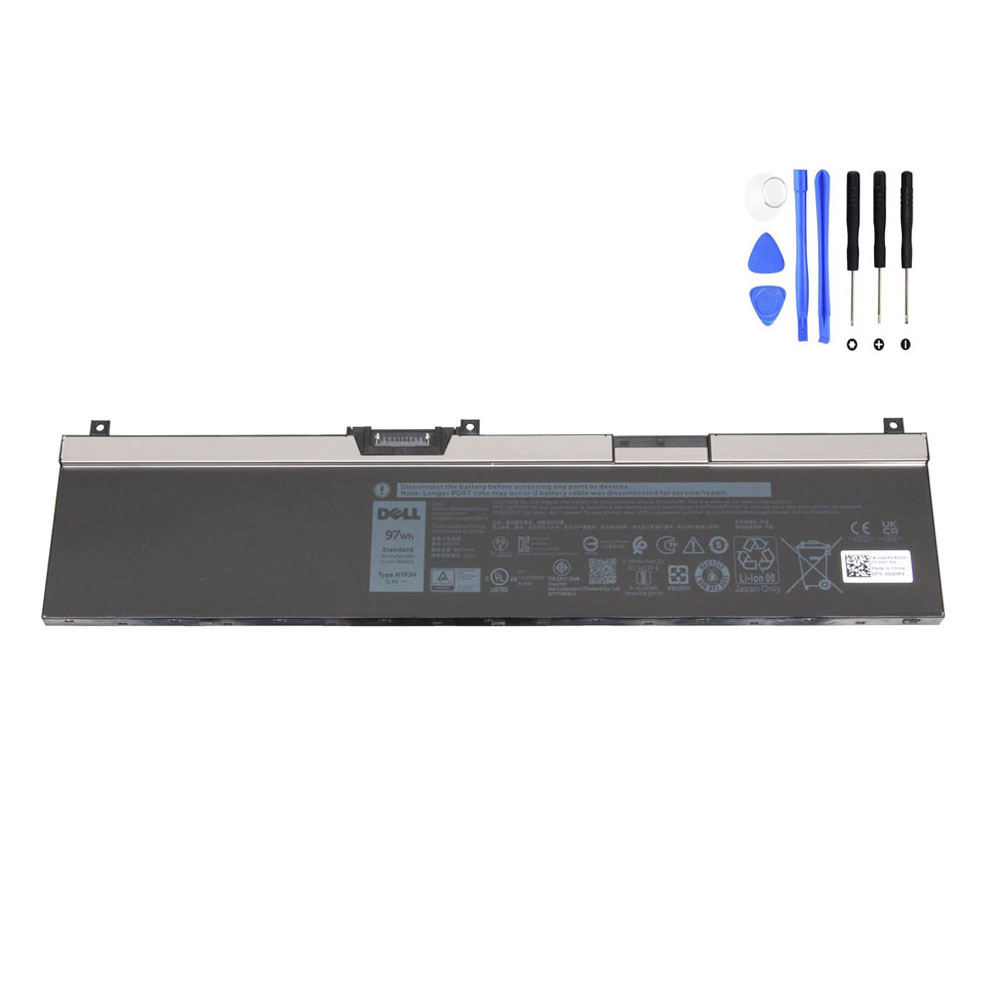
View the 97Wh Dell NYFJH Battery Product Page
Why Dell Precision 7540 Battery Searches Often Lead to Confusion
The Dell Precision 7540 is a mobile workstation designed for demanding professional use. Depending on how the system was configured at the factory, Dell offered it with different internal battery options. That means two Precision 7540 laptops can look identical from the outside while using different batteries inside.
This matters because an online listing may correctly mention “Precision 7540,” yet still not match the battery that is actually installed in your machine. Buyers who skip the identification step often end up with a battery that is physically different, lower in capacity than expected, or simply not the right replacement for their configuration.
The Two Main Battery Paths: 64Wh vs 97Wh
For the Dell Precision 7540 generation, the most important distinction is between the 64Wh battery and the 97Wh battery. Dell’s official setup and specification documentation shows both battery options for this model family. The same pattern also appears across related models such as the Precision 7730 and 7740.
In simple terms:
- 64Wh battery: smaller capacity, typically 4-cell
- 97Wh battery: larger capacity, typically 6-cell
The Dell NYFJH belongs to the larger battery category. On your product page, it is listed as:
- Model: NYFJH
- Capacity: 8070mAh / 97Wh
- Voltage: 11.5V
- Cells: 6-cell
That makes it a strong fit for users whose laptop originally shipped with the high-capacity battery configuration.
How to Tell Which Battery Your Precision 7540 Uses
The safest way to identify the correct replacement is to inspect the battery currently inside your laptop. Do not rely on search results alone. Do not rely on marketplace title wording alone. And do not assume that every Precision 7540 automatically uses the 97Wh version.
Instead, check the following points carefully.
1. Read the Original Battery Label
The label on the old battery is the most reliable source of information. Look for:
- Part number such as NYFJH
- Capacity such as 97Wh or 64Wh
- Voltage rating
- Cell count
- Any Dell DP/N or compatible reference numbers
If the battery label clearly says NYFJH and 97Wh, then the choice is straightforward. In that case, you should focus on a matching NYFJH replacement.
2. Check the Capacity in Wh, Not Just mAh
Some buyers compare batteries only by mAh, which can cause confusion. For replacement matching, the Wh rating is one of the most useful identifiers because it directly reflects the battery class used in the laptop family.
For the Precision 7540, the big difference is easy to remember:
- 64Wh = smaller battery version
- 97Wh = larger battery version
If your current battery is labeled 97Wh, you should stay in the 97Wh family when choosing a replacement.
3. Compare the Physical Shape
Dell’s published battery dimensions for this workstation generation show that the 97Wh battery is substantially longer than the 64Wh version, even when width and thickness are in a similar range. This is one of the easiest ways to distinguish the two battery families once the bottom cover is removed.
When comparing the battery physically, pay attention to:
- Overall battery length
- Mounting points and screw hole positions
- Connector location
- Cable direction
- Battery contour and edge shape
If the battery in your laptop has the longer 6-cell high-capacity layout, that is a strong sign you are looking at the 97Wh family rather than the smaller version.
4. Check the Part Number Family
The Dell NYFJH battery may also appear together with related compatible numbers on replacement listings. Your product page lists multiple associated references, including 0CJ18V, 0DP9KT, 0FY2VW, 0GW0K9, 0NYFJH, 0VRX0J, 0WMRC, 451-BCFS, 451-BCGI, 7M0T6, CJ18V, DP9KT, FY2VW, GW0K9, NYFJH, VRX0J and others. This is helpful because many buyers search by whichever code they find on the old battery label.
If your old battery matches one of these part numbers and also matches the 97Wh size and voltage class, that is strong evidence that the NYFJH family is the correct direction.
Why Dell Used More Than One Battery Option
On workstation laptops, internal space is often shared between the battery and other components such as storage devices, cooling hardware, and performance-focused configurations. That is one reason manufacturers like Dell sometimes offer more than one battery size within the same laptop family.
For a buyer, the important takeaway is simple: the laptop model name alone is not enough. The battery choice depends on the specific internal configuration of the machine you actually own.
What Happens If You Order the Wrong Battery
Ordering the wrong battery usually causes one of three problems:
- The battery does not physically fit the mounting area
- The connector or cable routing does not match
- The battery capacity/version does not correspond to what your system was designed to use
Even if the seller’s title includes “Precision 7540,” a mismatch can still happen if the listing represents the other battery version. This is why buyers should treat battery replacement as a part-number-and-shape match, not just a model-name match.
When the 97Wh NYFJH Is the Better Choice
If your Precision 7540 originally uses the larger battery layout, replacing it with the correct 97Wh NYFJH makes sense for several reasons:
- It restores the battery class the laptop was built around
- It supports longer unplugged runtime than the smaller version
- It better suits workstation use cases such as CAD, engineering work, diagnostics, and professional travel
- It helps mobile users depend less on AC power during meetings, site visits, and field work
For professional users, capacity is not just a number on paper. On a performance laptop, a larger correctly matched battery can make a major difference in real-world usability.
Signs You Should Inspect the Battery Before Ordering
You should open the bottom cover and inspect the installed battery directly if:
- You are not sure whether your laptop uses 64Wh or 97Wh
- The old battery no longer holds a charge
- The battery is swollen
- The listing photos online are inconsistent
- You only have the laptop model name but no battery part number
This step is especially worthwhile on the Precision 7540 because the cost of getting the wrong battery is not just financial. It also means lost time, extra disassembly, delayed repair, and possible downtime for a work-critical machine.
A Safe Buying Checklist
Before ordering a Dell Precision 7540 replacement battery, verify all of the following:
- The original battery part number
- The Wh rating
- The voltage class
- The physical battery length and shape
- The connector position
- The compatible model series
- The compatible part number family
If your original battery is labeled NYFJH or clearly belongs to the larger 97Wh 6-cell family, you can review the matching replacement here:
Final Thoughts
The most important step in a Dell Precision 7540 battery replacement is not the purchase itself. It is the identification process before the purchase. Because this workstation family may use either a 64Wh battery or a 97Wh battery, the correct replacement depends on what is physically installed in your laptop now.
If your machine uses the larger battery version, the 97Wh Dell NYFJH battery is the option to focus on. Checking the old battery label, Wh rating, part number, and physical layout first will help you avoid the most common replacement mistake and order with confidence.