If your HP Envy x360 still runs fine but the battery life has become frustrating, then yes—replacing the battery is usually worth it. A new battery can restore portable runtime, fix random shutdowns caused by battery wear, and help the laptop feel “usable again” without spending money on a whole new device.
The key is compatibility: “Envy x360” covers many generations, and different Envy x360 sub-models use different batteries. In this guide, I’ll show you how to decide if replacement makes sense, and how to match the correct battery to your exact Envy x360 model code (like 15-bp, 15-bq, 15-cn, 15-cp, etc.).
When is an HP Envy x360 battery replacement worth it?
- Your laptop is still fast enough for what you do (work/school/browsing), but battery life is poor.
- Battery percentage jumps (e.g., 45% → 8%) or drops unusually fast.
- It only works on the charger or shuts off when you unplug.
- Charging is abnormal (stuck at a % or takes forever) even after basic troubleshooting.
- Battery health warnings appear in HP diagnostics or Windows battery reports.
Not worth it (or at least: handle carefully) if you suspect battery swelling (bulging bottom cover, lifting trackpad, gaps near the palm rest). In that case, stop using it on battery power and consider professional help—swollen lithium batteries should be handled with caution.
Step 1: Identify your exact Envy x360 model (this matters)
HP often uses different batteries even within the same “Envy x360” family. The safest way is to identify your laptop using:
- Full model code on the bottom label (example formats: Envy x360 15-cn0xxx, 15-bq0xx)
- HP Product Number (P/N) on the sticker
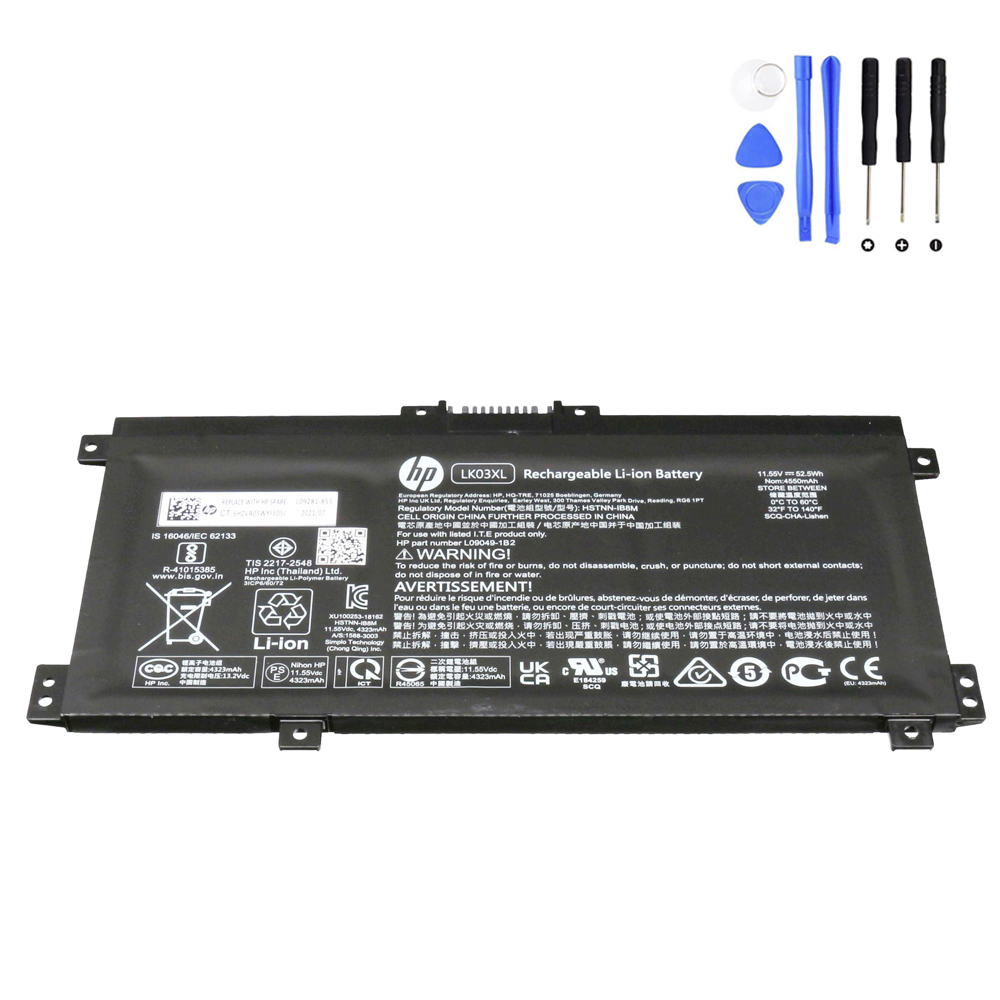
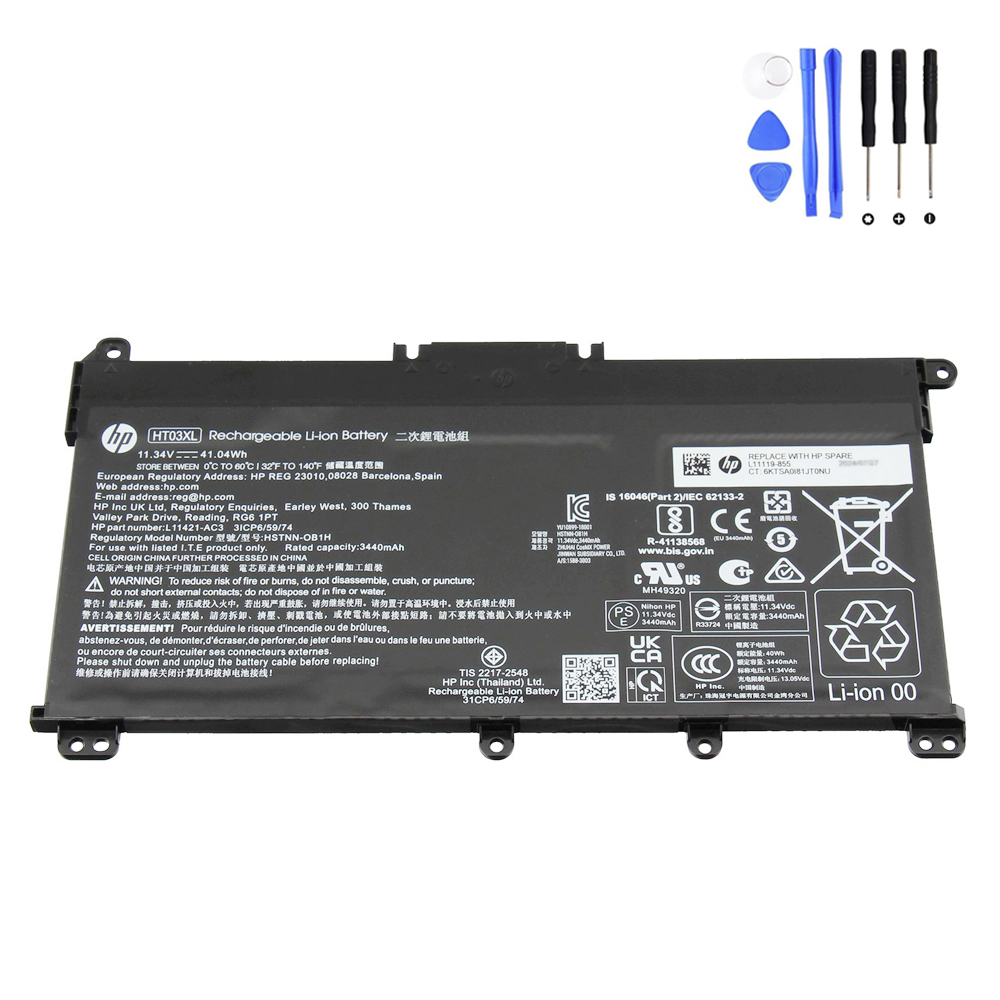
- Battery model + HP spare number (example: LK03XL / L09281-855 or HT03XL / L11119-855)
On HP batteries, the line “Replace with HP spare …” plus the battery code (like LK03XL or HT03XL) is usually the most accurate reference. (HP uses this exact matching approach across its battery catalog.)
Tip: If you don’t want to open the laptop, start with the full model code + product number, then confirm with the battery code once you’re ready to replace it.
(This matching workflow is the same approach described on your HP battery category page: check the bottom sticker, then match battery model + HP spare number.)
Step 2: Choose the right battery (LK03XL vs HT03XL)
| Battery | Capacity | Voltage | Cells | Common HP spare / part numbers | Common Envy x360 model series |
|---|---|---|---|---|---|
| LK03XL | 52.5Wh (4500mAh) | 11.55V | 3-cell | L09281-855, 916368-421, 916368-541, 916814-855, HSTNN-LB7U, TPN-W127/128, TPN-I129… | Envy x360 15-bp, 15-bq, 15-cn, 15-cp, plus many 15m- and 15t- variants (details below) |
| HT03XL | 41.04Wh (3600mAh) | 11.4V | 3-cell | L11119-855, L11119-856/857, HT03041XL, HSTNN-IB80/DB8R/DB8S… | Some Envy x360 15-cn sub-series (example: 15-cn1000/15-cn1600/15-cn1800) and other HP 14/15/17 families (details vary—confirm by part number) |
Important: HP can ship the same “15-cn” family with different internal layouts depending on region/SKU. Always confirm by battery code + HP spare number and physical shape before ordering.
Detailed HP Envy x360 models covered by LK03XL (common matches)
If your Envy x360 model code matches one of these families, LK03XL is often the correct battery (still verify the HP spare number on your old battery):
- HP Envy x360 15-bp000 / 15-bp100
- HP Envy x360 15-bq000 / 15-bq100 / 15-bq200
- HP Envy x360 15-cn0000 / 15-cn0100 / 15-cn0200 / 15-cn0300 / 15-cn0400 / 15-cn0700 / 15-cn0800 / 15-cn1000 / 15-cn1800
- HP Envy x360 15-cp0000 / 15-cp0800
- HP Envy x360 15m-bp000 / 15M-BP100
- HP Envy x360 15m-bq000
- HP Envy x360 15m-cn0000
- HP Envy x360 15m-cp0000
- HP Envy x360 15t-cn100 (series)
Detailed HP Envy x360 models that may use HT03XL (confirm by HP spare number)
HT03XL is widely used across many HP 14/15/17 families, and it also appears in some Envy x360 branches such as:
- HP Envy x360 15-cn1000
- HP Envy x360 15-cn1600
- HP Envy x360 15-cn1800
Because HT03XL is also used in other HP laptop families, the safest match is: your old battery label says HT03XL and/or Replace with HP spare L11119-855 (or a compatible HP spare number).
If you want a step-by-step example of internal battery replacement workflow, this HT03XL replacement guide shows the general process (tools, safety steps, disconnect/reconnect, calibration):
Quick “worth it” checklist (HP Envy x360)
- Worth it if: the laptop meets your needs + battery life is the main problem.
- Worth it if: you’re getting shutdowns on battery, but the machine works normally on AC power.
- Worth it if: the chassis is in good condition (hinges, keyboard, screen are fine).
- Maybe not if: you also have major performance limits (very slow CPU/RAM for your needs) + other repairs are needed.
- Safety first if: you see swelling/bulging—handle as a priority repair and avoid continued use.
FAQ
1) My Envy x360 battery drains fast—how do I confirm it’s actually worn out?
Use a Windows battery report (it shows design capacity vs full charge capacity). If the full charge capacity is much lower than design capacity, the battery is worn. You can also run HP diagnostics if available.
2) Can I replace an Envy x360 battery myself?
Most Envy x360 models use internal batteries. If you’re careful with screws and connectors, it’s doable. Follow a safe workflow: power off, unplug, open the base cover, disconnect battery connector, remove screws, install the new pack, reconnect, then calibrate.
3) After replacement, my Envy x360 won’t power on—what should I try first?
Common fixes are: reseat the battery connector, do an embedded controller reset (hold the power button with AC unplugged), and then boot on AC power. These are standard troubleshooting steps in many HP battery replacement workflows.
4) Will a higher Wh battery improve battery life?
Usually, yes—higher Wh (like 52.5Wh) can mean longer runtime than a lower Wh pack, assuming it’s the correct battery for your chassis and the laptop supports it. Do not “upgrade” across battery models unless the physical fit and part-number match is confirmed.
Search by your HP spare number (most accurate) or your battery code (LK03XL / HT03XL).