Modern Dell laptops – especially XPS, Latitude, Inspiron, Vostro, Precision and Chromebook models – increasingly rely on
USB-C power delivery (PD) instead of the classic round-barrel connector. USB-C makes it possible to charge your laptop, phone,
tablet and accessories with one cable, but it also creates a new problem:
not every USB-C charger can safely and properly power your Dell laptop.
If your original Dell USB-C adapter is lost, damaged or unreliable, you have probably already seen symptoms like:
- Dell warning messages such as “USB-C charger not recognized” or “Adapter wattage cannot be determined”
- Battery charging very slowly, or not charging while you are working
- Laptop performance dropping when you start a game, video call or heavy workload
- USB-C plug or cable getting unusually hot
In this article, we look at the most common issues users face when replacing a USB-C charger and explain how a
20V 3.25A 65W Dell USB-C AC adapter can solve them – as long as you choose a unit that matches Dell’s power delivery requirements.
1. Why many generic USB-C chargers fail with Dell laptops
USB-C looks simple from the outside – one small reversible connector – but the internal power negotiation is complex.
There are many different power levels and charging standards:
- Phone chargers that only supply 5V or 9V (15–27W)
- Tablet chargers around 30W or 45W
- Laptop chargers at 45W, 60W, 65W and higher
When you plug a generic USB-C charger into a Dell laptop that expects a 65W USB-C PD adapter, several problems can appear:
- The charger only offers 30W or 45W, so the laptop can charge at idle but drains the battery under load.
- The power profile is wrong – for example, it never offers the 20V output Dell expects for full performance.
- The cable is not rated for 65W+ (no e-marker), leading to voltage drops and heat at the connector.
- Dell firmware does not recognize the adapter correctly and limits CPU/GPU performance for safety.
That is why it is safer to choose a charger that is specifically built to match Dell’s USB-C specifications, rather than any random “65W USB-C charger”.
2. Inside the spec: what the 20V 3.25A 65W Dell USB-C adapter actually provides
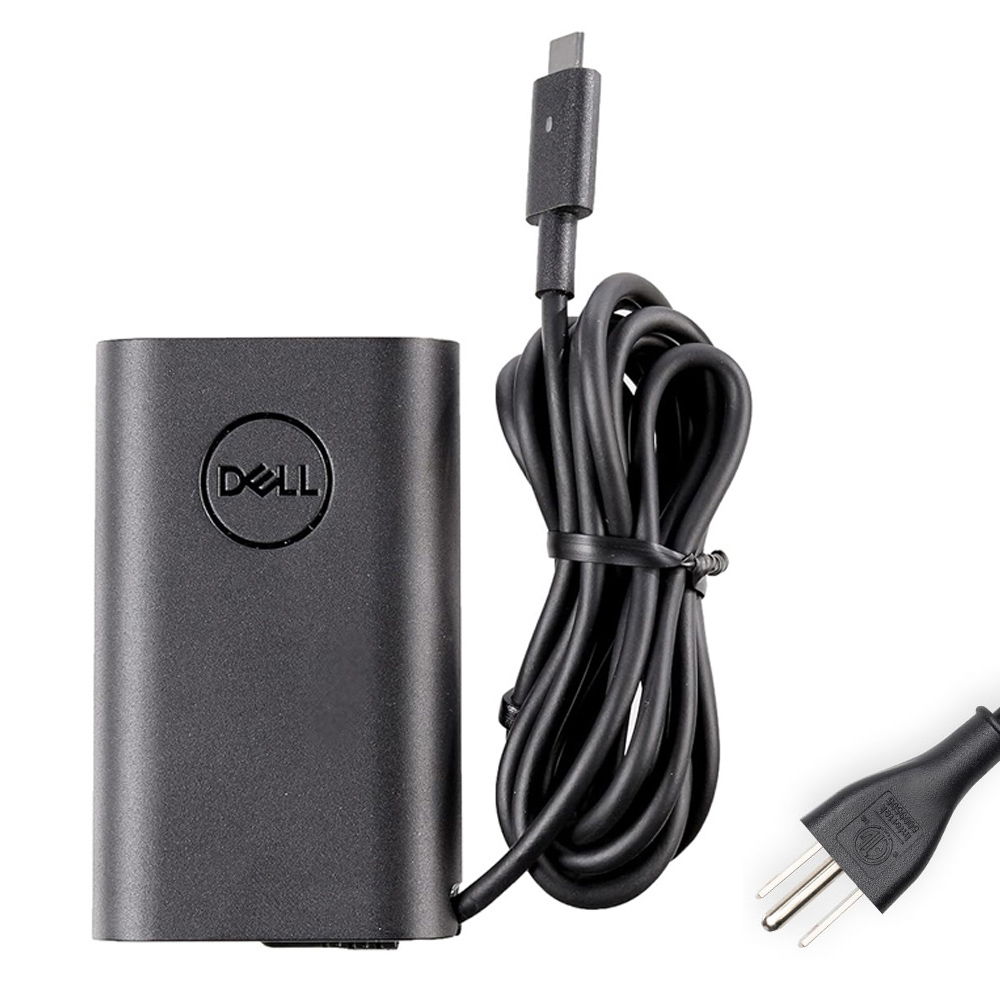
Our 20V 3.25A 65W Dell USB-C AC Adapter Charger is designed as a compatible replacement for genuine Dell USB-C laptop chargers.
Here is what the label tells you:
- Input: 100–240V ~ 50–60Hz (worldwide mains compatibility)
- Color: Black
- Main laptop profile: 20V / 3.25A (up to 65W)
- Additional PD profiles:
- 20V / 3A (up to 60W)
- 15V / 3A (45W)
- 9V / 3A (27W)
- 5V / 3A (15W)
- Total power: up to 65W depending on negotiation
- Connector: USB-C
- Package includes: 1 × Dell-compatible USB-C charger + 1 × AC power cord (matched to your country)
- Warranty: 12 months, with 30-day return policy
The multiple PD profiles mean this adapter can automatically switch between 5V, 9V, 15V and 20V modes,
depending on what the connected device requests. For a Dell laptop, the most important profile is
20V at up to 3.25A, which delivers the full 65W needed for normal operation.
Note: this is a high-quality compatible replacement charger for Dell devices. It is not an original Dell OEM adapter.
3. Typical problems when your Dell USB-C charger is failing
From a user’s perspective, charger issues usually look like one or more of these scenarios:
1) “Adapter not recognized” or “Wattage cannot be determined”
Dell BIOS and Windows may pop up warnings if the laptop cannot correctly identify the charger’s wattage.
This often happens with under-rated USB-C adapters or cheap units that do not fully support Dell’s PD requirements.
The laptop may:
- charge slowly or not charge under load, and
- limit CPU/GPU performance to prevent power issues.
2) Laptop only charges when idle
You might see the battery percentage climb while browsing the web, but start dropping when you open Zoom,
a game or a heavy application. This is a classic sign that:
- the adapter cannot provide the required 65W, or
- the charger is stuck on a lower PD profile (for example, 15V 3A).
3) Overheating or unstable connection
If the USB-C plug feels hot, or the power drops in and out when you move the cable, the original charger or cable may be worn out.
Replacing it with a fresh, properly rated 65W Dell-compatible unit is usually safer than continuing to use a damaged adapter.
4. Dell part numbers this 65W USB-C adapter can replace
Dell uses many different part numbers (P/N) and marketing codes for chargers that are electrically identical.
This 20V 3.25A USB-C adapter is designed as a replacement for a wide range of genuine Dell USB-C chargers, including (but not limited to):
01F45P, 022JKR, 02YK0F, 0CJG9W, 0D2YG, 0JJV9D, 0JYJNW, 0M0RT, 0RGF3F, 0VT148, 0WMDHR, 0XVH3P, 0Y7R4, 1DVRJ, 1F45P, 1N3PY,
20HYG, 22JKR, 2WDR5, 2Y7R4, 2YK0F, 450-AGOB, 450-ALJL, 450-ALQR, 450-BBVD, 450-BBWD, 48P28, 55NVC, 56FVH,
68V14, 6D35N, 6FNJG, 6T7NR, 723JG, 7F38C, 7HGF6, 7P6HW, 85W87, 921CW, 9GFC6, C5PVT, CJG9W, CN-0XVH3P,
DA65NM170, HA60NM200, HA65NM170, HA65NM190, HKA65NM200, LA60NM200, LA65NM170, LA65NM190, FHYND, FTTTJ, GJJYR,
HN6C1, HRR76, JJV9D, JYJNW, K5MD6, K60KM, KKT2W, M1WCF, MVPDV, R0J7H, RGF3F, T3JDJ, T8W34, V2TJ7, V6YKG,
VFHDX, VH2W4, VMJKJ, VT148, WMDHR, XVH3P, YRP78…
You will find these codes on the label of your original Dell charger. If your part number appears in this list and your laptop expects a 65W USB-C adapter,
this replacement charger is designed to be compatible.
5. Compatible Dell laptop families
Because this adapter follows Dell’s 65W USB-C PD specification, it supports a long list of Dell models, including but not limited to:
- Dell XPS 13 / XPS 14 – many XPS 13 generations (9360, 9370, 9380, 7390, 9300, 9310, 9315, 9340, 9345, 9320 2-in-1, etc.) and newer 14-inch models.
- Dell Inspiron – Inspiron 13, 14, 15, 16 and 17 series, including multiple 2-in-1 versions (7xxx and 5xxx families).
- Dell Latitude – Latitude 11, 12, 13, 14, 15 and 16 families, plus Rugged and 2-in-1 variants.
- Dell Precision (mobile) & Pro / Plus series – selected Precision 14/15 mobile workstations and Dell Pro 13 / 14 / 16 models that ship with a 65W USB-C adapter.
- Dell Chromebook & Venue – Dell Chromebook 11 / 13 and Venue Pro tablets that support USB-C PD charging.
- Dell Vostro – Vostro 13, 14, 15 and 16 laptops that use 65W USB-C power delivery.
Because Dell refreshes its product lines frequently, always confirm compatibility with the checklist below instead of relying only on the series name.
6. How to check if this 65W Dell USB-C charger is right for your laptop
Use this 4-step checklist before you order:
Step 1: Confirm your laptop supports USB-C charging
- Check the sides of your laptop for a USB-C port.
- Look for a small power plug icon or battery symbol next to the port. If there is no marking, check the user manual or Dell’s official specs to confirm the port supports charging.
Step 2: Verify the required wattage
- On your original charger label, look for Output: 20V ⎓ 3.25A / 65W (or something very close, for example 20V 3.25A 65W).
- If your laptop shipped with a 90W or 130W adapter, a 65W USB-C charger may not be sufficient for full performance.
Step 3: Match the Dell part number (if available)
- Find the Dell part number (P/N or DP/N) on the original adapter: it often looks like LA65NM170, HA65NM190, DA65NM170 or similar.
- Check whether this number appears in the compatible part-number list on the product page.
Step 4: Confirm with your exact laptop model
- On the bottom of the laptop or in BIOS, you can see the model name (for example XPS 13 9310, Latitude 5420, Inspiron 14 2-in-1 (7420)).
- Compare your model with the compatible model series list. If you are still unsure, contact support with your model name and a photo of the original adapter label.
7. Why choose a dedicated Dell-compatible USB-C charger instead of a random PD adapter?
Technically, many USB-C PD chargers can output 65W, but a Dell-compatible unit offers some practical advantages:
- Correct PD profiles for Dell laptops – including 20V 3.25A for full 65W operation.
- Stable operation with Dell firmware – reduces warnings and performance throttling.
- Proper cable and connector quality – the USB-C plug and cable are designed to handle 65W safely.
- Consistent mechanical fit – the connector length and housing are matched to Dell’s port design.
- After-sales support – 12-month warranty and 30-day return policy if anything is not as expected.
8. Summary: when is this 20V 3.25A 65W Dell USB-C adapter a good choice?
You should consider this charger if:
- Your Dell laptop supports USB-C charging and originally shipped with a 65W USB-C adapter.
- Its label shows a 65W rating (20V around 3.25A) and a Dell part number from the compatible list.
- You are currently seeing “adapter not recognized” or slow-charging issues with a generic USB-C charger.
- You want a safe, reliable replacement with worldwide input voltage and proper PD support.
By matching the USB-C connector, 20V 65W power rating, Dell part number and your exact model,
you can be confident that this 20V 3.25A 65W Dell USB-C AC adapter charger will restore stable charging and performance to your Dell laptop –
without the guesswork and risks that come with random third-party USB-C power bricks.