Many Razer Blade Stealth 13 owners only start thinking about their battery when something feels
“off”: the laptop dies much faster than before, the battery percentage jumps around, or the machine
shuts down in the middle of a game even though it still shows 20–30% remaining. If this sounds
familiar, your original Razer battery (RC30-0281 series) may be reaching the end of its life.
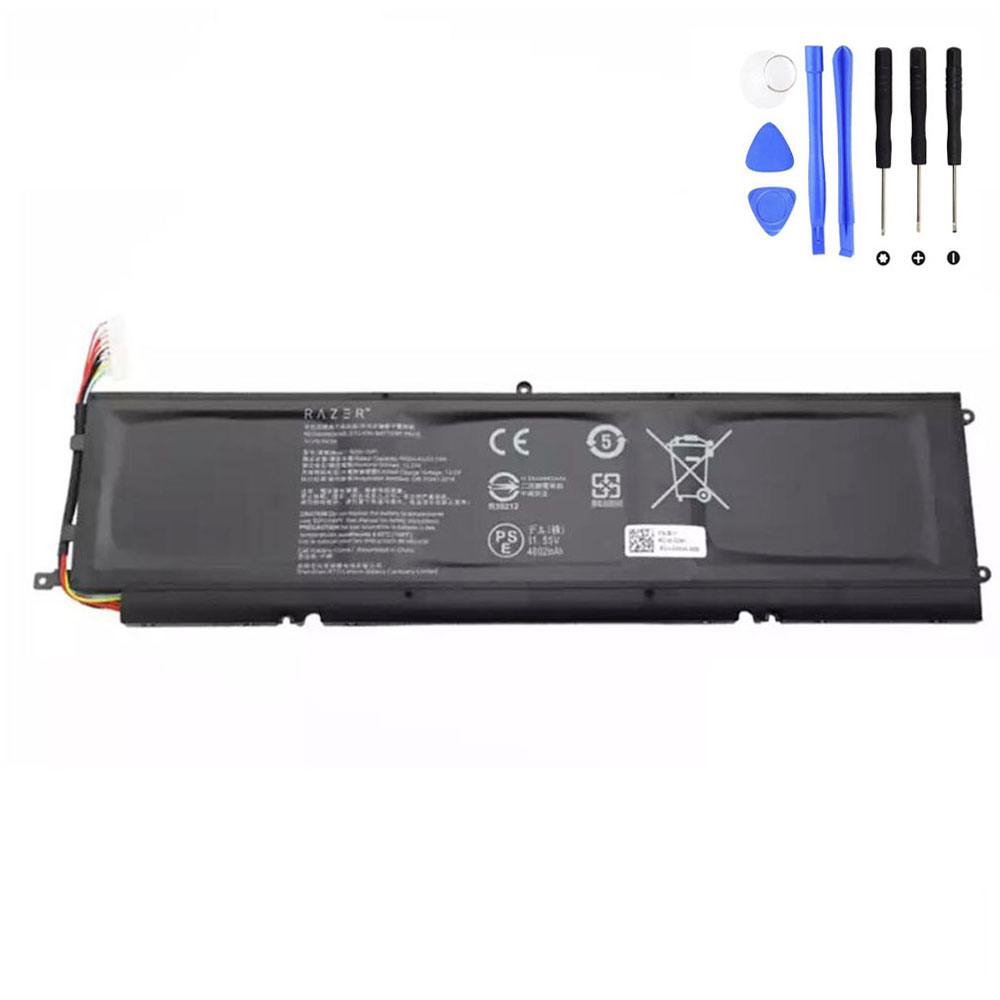
53.1Wh Razer RC30-0281 Replacement Battery for Razer Blade Stealth 13
Brand new 53.1Wh (4602mAh, 11.55V) battery compatible with Razer Blade Stealth 13 models such as
RZ09-02810, RZ09-02812, RZ09-03101 and RZ09-03102, replacing RC30-0281 / RC30-02810200 and related part numbers.
If you use another Razer laptop, you can browse our
Battery for Razer
category to find the right battery for your model.
In this guide, we’ll walk through the most common symptoms of a failing Razer Blade Stealth 13
battery, how to confirm that the battery is the real problem, and why a high-quality replacement
like the 53.1Wh RC30-0281 battery is the safest way to restore your laptop’s mobility and
performance.
Quick navigation
- 1. Common symptoms of a failing Razer Blade Stealth 13 battery
- 2. How to confirm your battery is the real issue
- 3. Inside the 53.1Wh Razer RC30-0281 replacement battery
- 4. Is it safe to keep using a bad battery?
- 5. Replacement options: DIY vs professional service
- 6. How to care for your new Razer battery
1. Common symptoms of a failing Razer Blade Stealth 13 battery
Lithium-ion batteries don’t usually fail overnight. Instead, they show a series of warning signs
over weeks or months. If you own a Razer Blade Stealth 13 (for example
RZ09-02810, RZ09-02812, RZ09-03101 or
RZ09-03102), watch out for these symptoms:
1.1 Rapid battery drain and inconsistent runtime
- Your laptop used to last 5–7 hours on normal use, but now it only lasts 1–2 hours.
- The battery percentage drops extremely fast once it goes below 50%.
- You notice big jumps in percentage, such as from 40% down to 15% in a few minutes.
This usually means the battery’s usable capacity has significantly degraded. Windows tries to
estimate remaining runtime, but with aged cells the estimate becomes increasingly inaccurate.
1.2 Sudden shutdowns even with charge remaining
- The system powers off abruptly during gaming, video editing or streaming.
- Windows might show 20–30% battery remaining just before the shutdown.
- After you restart, the battery percentage may suddenly show a much lower value.
This is a strong indicator that one or more cells inside the battery pack cannot hold stable
voltage under load. The protection electronics shut the laptop down to prevent damage.
1.3 “Plugged in, not charging” or stuck at a low percentage
- Windows shows “Plugged in, not charging” for long periods.
- The battery is stuck at a certain percentage (for example 60%) and never goes higher.
- The laptop runs normally on AC power, but the moment you unplug, it dies quickly.
Sometimes this is caused by software or the AC adapter, but very often on older Razer Blade
Stealth 13 units it’s simply the battery reaching its end of life. The controller limits charging
because the cells can no longer safely take a full charge.
1.4 Overheating or a noticeably warm palm rest
- You feel unusual warmth around the bottom case or palm rest during light usage.
- The fan comes on more often even when you are browsing or working in Word.
A heavily degraded battery can run hotter, especially when it is trying to charge and discharge
frequently. While many factors can cause heating (CPU, GPU, dust), a battery that is both warm and
weak in capacity deserves attention.
1.5 Battery swelling or a lifted touchpad
- The touchpad feels raised or no longer clicks properly.
- You may see a slight bulge in the bottom cover.
Swelling is a critical safety warning. A swollen battery must be replaced as soon as possible, no
matter how well the laptop still works. It can damage the chassis, keyboard, touchpad and even
pose a fire risk if ignored.
1.6 Windows battery health warnings
- Windows or Synapse shows messages about battery health being “Very poor” or “Needs
replacement”. - Battery report (or manufacturer tools) show high cycle counts and significantly reduced
capacity.
These software warnings don’t always appear, but when they do, they confirm what you are already
experiencing in daily use.
2. How to confirm your battery is the real issue
Before you decide to replace the RC30-0281 battery, it’s smart to rule out other possible causes:
2.1 Test with the original or a known-good charger
- Use the original Razer charger if possible.
- Check the port and cable for visible damage or looseness.
- If you have a compatible spare adapter, see if the behavior changes.
If the laptop behaves the same with different compatible adapters, the problem is most likely
inside the battery, not the charger.
2.2 Run a battery report in Windows
On Windows 10/11 you can generate a built-in battery report:
- Open Command Prompt as Administrator.
- Type
powercfg /batteryreportand press Enter. - Windows saves an HTML report (usually in your user folder).
Compare the Design Capacity to the Full Charge Capacity. If your
full charge capacity is much lower than the design capacity (for example less than 60%), it
confirms significant wear.
2.3 Use Razer diagnostics or BIOS information
- Run any Razer or system diagnostics tools for the battery (if available).
- Check in BIOS/UEFI whether the battery status is reported as “Normal” or shows a warning.
If all tests show low capacity, charging problems or health warnings, and you experience at least
one of the major symptoms above, your battery is most likely due for replacement.
3. Inside the 53.1Wh Razer RC30-0281 replacement battery
For Razer Blade Stealth 13 models from 2019–2020, the typical internal battery is identified by
part numbers such as RC30-0281 or RC30-02810200. When replacing
it, you want a battery that closely matches the original electrical specifications to ensure
stability and performance.
3.1 Key specifications
| Item | Specification |
|---|---|
| Condition | Brand New replacement battery |
| Color | Black |
| Capacity | 4602mAh / 53.1Wh |
| Voltage | 11.55V |
| Number of cells | 3-cell lithium-ion pack |
| Warranty | 12-month warranty with 30-day return policy |
| Package includes | 1 × battery for Razer Blade Stealth 13 |
3.2 Compatible part numbers (selection)
A high-quality replacement battery is designed to be compatible with several Razer part numbers,
including (but not limited to):
- Razer RC30-0281
- Razer RC30-02810200
- Razer RZ09-02812E52-R3C1
- Razer 3ICP6/59/84
3.3 Compatible Razer Blade Stealth 13 models (partial list)
- Razer Blade Stealth 13 2020 RZ09-03102
- Razer Blade Stealth 13 RZ09-02812
- Razer Blade Stealth 13 RZ09-02810
- Razer Blade Stealth 13 GTX 1650 2019 RZ09-03101
If your laptop model or part number appears in these lists, a 53.1Wh RC30-0281 compatible battery
is an appropriate replacement for your original pack. If you have a different Razer notebook,
visit our
Battery for Razer
category to see more Razer battery options.
Check compatibility and order the 53.1Wh RC30-0281 battery now
4. Is it safe to keep using a bad or swollen battery?
Many users try to postpone replacement by staying plugged in all the time. While your Blade Stealth
13 can technically run on AC power with a weak battery, it is not always safe or practical:
-
Sudden shutdowns can corrupt files or interrupt work, especially during updates
or gaming. -
Overheating or swelling can physically damage the touchpad, keyboard and
internal components. -
A failing cell can stress the charging circuitry and increase the risk of further
hardware problems.
If you see any swelling or cracks, or if the battery becomes very hot, stop using it on battery
power and plan a replacement as soon as possible.
5. Replacement options: DIY vs professional service
The Razer Blade Stealth 13 is a slim, compact ultrabook. Replacing the RC30-0281 battery is
possible for experienced users, but it does require care and the correct tools.
5.1 What a typical replacement involves
- Shutting down the laptop and disconnecting the charger.
- Removing the bottom case screws (often Torx) and carefully lifting the cover.
- Disconnecting the battery cable from the motherboard.
- Unscrewing and removing the old battery pack.
- Installing the new 53.1Wh RC30-0281 compatible battery and reconnecting the cable.
- Reassembling the bottom cover and testing the system.
If you are not comfortable opening your laptop, it’s perfectly reasonable to take the replacement
battery to a professional repair shop. You provide the correct battery; they provide the labor.
5.2 Why choose a dedicated replacement instead of a generic pack
-
Correct voltage (11.55V) and capacity (53.1Wh) to match the
original design. - Designed for Blade Stealth 13 power delivery and form factor.
-
Integrated protection features (over-charge, over-discharge, short-circuit and temperature
protection). - Warranty support (for example, 12 months with 30-day return) for peace of mind.
6. How to care for your new Razer RC30-0281 battery
Once you’ve installed a new 53.1Wh RC30-0281 battery, a few simple habits will help you get the
longest possible lifespan:
-
First cycles: Use the laptop on battery for a few charge–discharge cycles
between ~20% and 90% to let Windows and the battery controller “learn” the new capacity. -
Avoid constant 0% or 100%: It’s fine occasionally, but living at the extremes
shortens battery life over time. -
Keep it cool: Try not to block the vents, especially during gaming. High
internal temperatures accelerate battery wear. -
Storage: If you won’t use the laptop for weeks, store it around 40–60% charge
in a cool, dry place.
With a fresh battery and good charging habits, your Razer Blade Stealth 13 can once again be the
portable machine it was designed to be – ready for work, study or gaming away from the wall
socket.
Replace your worn RC30-0281 battery and restore your Razer Blade Stealth 13