If you use an MSI gaming or creator laptop such as the GF63 Thin, Cyborg 15, Thin 15 or Summit series,
your system relies on a dedicated high-power AC adapter to deliver stable performance.
Once the original charger is lost, damaged or starts failing, you may see symptoms like:
- Battery not charging or charging extremely slowly
- Frame rate drops or CPU/GPU throttling when you start a game
- Random shutdowns when the system is under load
- Adapter becoming very hot or making buzzing noises
In these situations, a correct 120W replacement such as the
20V 6A 120W MSI 4.5 × 3.0 mm AC adapter restores the power your laptop was designed to use.
In this article, we explain what this adapter offers, which MSI models it supports and how to verify compatibility before you buy.
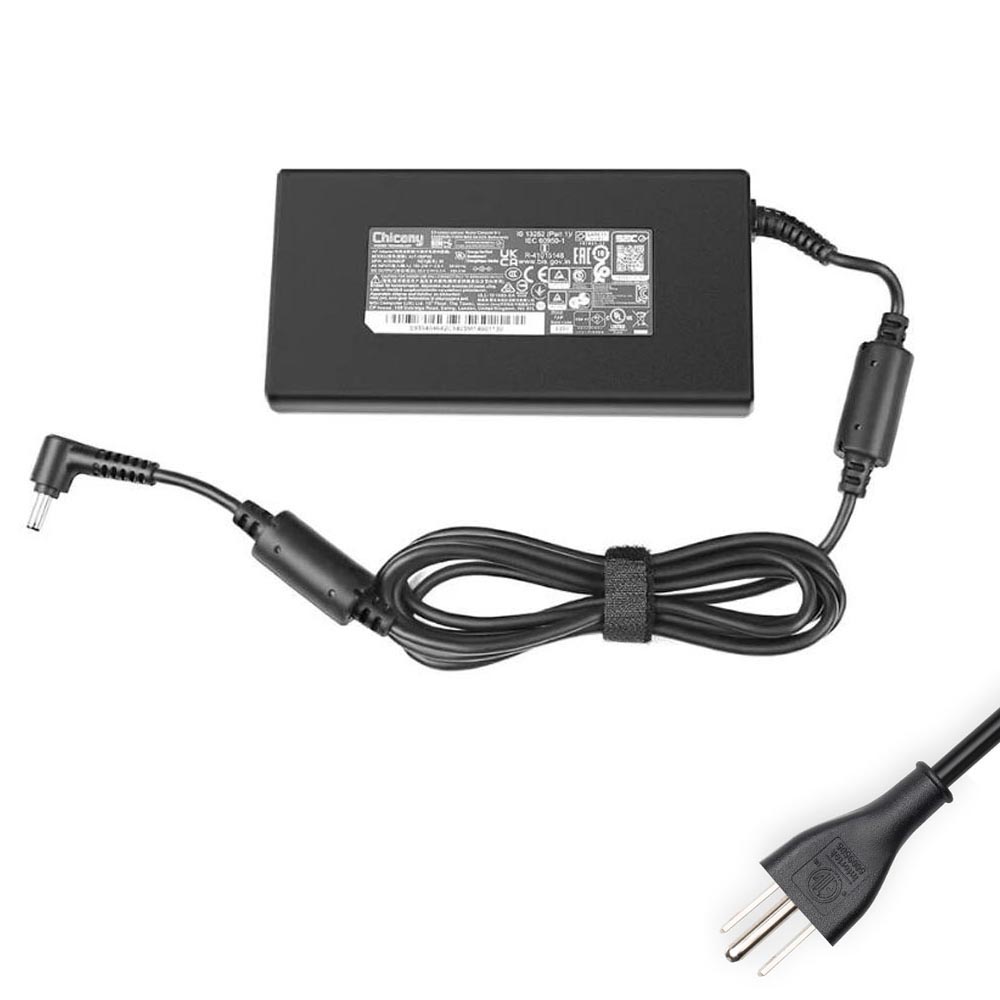
1. Product overview
This power supply is a high-quality, MSI-compatible replacement adapter aimed at thin-and-light gaming
and performance notebooks that require around 120W of power.
It provides a 20V 6A output and uses the common 4.5 × 3.0 mm barrel connector found on many MSI models.
It is also compatible with systems originally shipped with a 19.5V 6.15A 120W adapter.
- Item condition: Brand new
- Input: 100–240V ~ 50–60Hz (global mains support)
- Colour: Black
- Output voltage: 20V DC
- Output current: 6A
- Output power: 120W (compatible with 19.5V 6.15A 120W designs)
- Connector size: 4.5 mm (outer) × 3.0 mm (inner) barrel plug
- Package: 1 × MSI-compatible charger + 1 × AC power cord matched to your country
- Warranty: 12-month warranty + 30-day return policy
Note: this device is a high-quality compatible replacement for MSI adapters, not an original MSI-branded charger.
2. When do you really need to replace your MSI adapter?
From the user’s point of view, charger problems typically show up as:
Battery issues
- The laptop reports “plugged in, not charging”.
- The battery percentage goes down during gaming even though the adapter is connected.
- Charging takes much longer than it used to.
Performance throttling
- Games that used to run smoothly suddenly drop to low FPS when the GPU ramps up.
- Fans spin up, but performance feels worse than on battery or with the original charger.
Physical signs of failure
- The adapter casing is cracked, burnt or swollen.
- The cable is frayed near the plug or brick.
- The connector feels loose, sparks, or gets very hot.
If you’re experiencing one or more of these symptoms, continuing to use a faulty adapter isn’t safe for your laptop.
A suitable 120W replacement with the correct voltage and plug size is the right way to restore stable operation.
3. Supported MSI part numbers
MSI uses multiple internal part numbers (S-codes) for chargers that are electrically equivalent.
This 120W adapter is designed to replace several of these, including (but not limited to):
S930403480D04, S93-0403480-D04, S93-0403500-C54, S930403500MSK, S93-0403500-MSK,
S930403501C54, S93-0403501-C54, S930403501MSK, S93-0403501-MSK…
You can find these codes on the label of your original MSI adapter. If your number appears in this list
(and the rating is around 19.5–20V, 6A, 120W), this replacement is designed to be compatible.
4. Compatible MSI laptop series
This 20V 6A 120W adapter with a 4.5 × 3.0 mm barrel connector is suitable for many popular MSI thin gaming
and creator models, including (partial list):
- MSI GF63 / GF63 Thin – GF63 10SC, GF63 Thin 10SC / 10UC / 10UD, GF63 Thin 11UCX / 11UD, GF63 Thin 12UC / 12UCX / 12UD / 12UDX / 12VF / 12VE
- MSI Cyborg 15 – Cyborg 15 A12VF / A12VE, Cyborg 15 A13VF / A13VFK, Cyborg 15 AI A1UCX / A1UDX / A1VE / A1VEK
- MSI Thin series – Thin 15 B12UC, Thin 15 B12UCX and related configurations
- MSI Summit & CreatorPro – Summit E16 Flip A13UDT, CreatorPro M15 A11UIS and other 120W-class systems
This is only a partial list: MSI refreshes its product lines frequently, and many regional versions share the same 120W power design.
Always use the compatibility checklist below for final confirmation.
5. Compatibility checklist: how to be sure this 120W adapter fits your MSI laptop
1) Voltage and wattage
- Look at the label on your original MSI adapter or in your laptop’s user manual.
- Confirm that the output voltage is 19.5V or 20V and the power rating is around 120W (often written as 19.5V 6.15A or 20V 6A).
- If your original adapter is 150W, 180W or higher, this 120W charger will not be sufficient.
2) Connector size: 4.5 × 3.0 mm
- Check the DC plug of your current adapter. It should be a slim round barrel with an outer diameter of 4.5 mm and an inner diameter of 3.0 mm (often with a central pin).
- Compare the plug visually with the product photos on the page. The size and shape must match exactly for a proper fit.
3) MSI part number
- Locate the MSI part number on the original charger (for example S93-0403500-C54 or similar).
- Match it against the compatible part-number list. A direct match is a strong indicator of compatibility.
4) Laptop model name
- Find the precise model on the label at the bottom of your laptop (e.g. GF63 Thin 11UD, Cyborg 15 A13VF, Summit E16 Flip).
- Check that your series appears in the “Compatible Model Series” list or documents the use of a 120W adapter.
If any of these checks are unclear, it is best to send your model name and a photo of the original adapter label to support for a quick compatibility confirmation.
6. Why a proper 120W adapter matters for gaming and creator workloads
MSI gaming and creator laptops are designed to run CPUs and GPUs at relatively high power levels.
When the charger cannot deliver the required wattage, the laptop firmware responds by limiting performance or draining the battery to make up the difference.
Over time, using an under-rated or unstable adapter can:
- reduce battery lifespan (constant shallow discharge while plugged in),
- increase heat in the power circuitry, and
- lead to crashes or data loss during heavy workloads.
A correctly rated 120W 20V 6A adapter with the matching 4.5 × 3.0 mm connector keeps the power subsystem within its designed limits,
ensuring your MSI laptop can sustain boost clocks in games and creative applications without risking long-term damage.
7. Summary
If your MSI GF63 Thin, Cyborg 15, Thin 15, CreatorPro or Summit laptop originally shipped with a 120W adapter and a 4.5 × 3.0 mm plug,
this 20V 6A 120W MSI-compatible AC adapter is an excellent replacement option.
By checking:
- the required voltage (19.5–20V) and wattage (120W),
- the DC connector size (4.5 × 3.0 mm),
- your original MSI part number, and
- your exact model name,
you can be confident that this charger will restore safe, stable power and let your MSI laptop perform as intended –
whether you are gaming, editing, or simply working on the go.