The Dell XPS 15 is built like a premium laptop—excellent display options, strong performance, and solid build quality.
So when battery life starts dropping fast, the decision feels high-stakes:
Should you replace the battery, or is it time to buy a new laptop?
In most cases, if your XPS 15 is still performing well, battery replacement is one of the most cost-effective upgrades you can do.
But there are also situations where spending money on a battery is just delaying an inevitable replacement.
This guide gives you a practical way to decide in minutes.
Replace the battery if the laptop is otherwise stable and fast enough for your work. Consider a new laptop if you also have
performance limits, multiple expensive issues (screen/hinge/charging port), or reliability problems that go beyond battery wear.
- Real-world cost comparison (battery vs new laptop)
- What you actually gain from a new battery
- Decision rules: replace vs buy new
- Common scenarios (what most XPS 15 owners choose)
- Signs it’s truly a battery problem
- When it’s not the battery (charger/port/settings)
- How to choose the correct XPS 15 replacement battery
- Where to buy a compatible replacement
- FAQ
Real-world cost comparison (battery vs new laptop)
The price difference is obvious: a battery costs far less than a full laptop. But the smarter comparison is:
cost per year of useful life—and how much time you’ll spend re-setting up a new machine.
| Option | Upfront cost | Hidden cost (often ignored) | What you get |
|---|---|---|---|
| Replace the battery | Lower | Possible installation time (if internal), and you must confirm compatibility by part number. | Restored runtime, fewer shutdowns, and better stability unplugged—often extending usable life significantly. |
| Buy a new laptop | Higher | Data migration, reinstalling apps, sign-ins, printers/docks, and time spent tuning the new system. | New warranty, faster platform, newer ports/Wi-Fi, longer software support window, and potentially better efficiency. |
If your XPS 15 still works well, a battery replacement avoids a lot of time and friction.
What you actually gain from a new battery
A healthy battery doesn’t just improve runtime. On a worn battery, the XPS 15 can become unpredictable:
percentage drops fast, charging behavior becomes inconsistent, and the laptop may shut down suddenly when unplugged.
A replacement battery typically restores:
- Portable runtime (so the laptop is usable away from the charger again)
- Stable power delivery under normal workloads
- More accurate battery reporting (less jumping and “stuck” percentages)
- Less stress on the chassis if the old battery is aging (important for internal packs)
It will not make an old CPU faster, add RAM, fix overheating caused by dust/fans, repair a failing SSD, or solve display/hinge damage.
If your laptop feels slow on AC power, the battery is not your main problem.
Decision rules: replace vs buy new
Use the rules below. They’re intentionally practical—no guesswork, no complicated scoring.
Rule 1: If the laptop is still fast enough, replace the battery
Replace the battery when:
- Performance is acceptable for your daily work (web, office, school, light creative work, coding, etc.)
- The main issue is battery life, random shutdowns, or unstable charge percentage
- No major repairs are needed besides the battery
Rule 2: If you need multiple big repairs, consider buying new
Consider a new laptop if you have battery problems plus two or more of these:
- Charging port instability (only charges at an angle, loose USB-C/DC jack issues)
- Screen issues (flicker, lines, dead zones, hinge stress)
- Overheating / throttling that persists after cleaning and maintenance
- Storage/SSD issues (errors, frequent crashes, slow boot even on AC)
- Keyboard/trackpad physical problems or chassis damage
Rule 3: If you rely on newer features for work, buying new may be worth it
If your workflow needs modern features (e.g., newer GPU performance, better efficiency, specific ports, or a longer support runway),
then the “value” of a new laptop may outweigh a battery replacement.
If the XPS 15 feels like a “good laptop trapped behind a bad battery,” replace the battery.
If it feels like a “bad laptop with multiple issues,” consider replacing the whole machine.
Common scenarios (what most XPS 15 owners choose)
Best move: Replace the battery (high chance of great ROI).
Best move: Compare the cost of a battery + any upgrades you’d need (SSD/RAM) to a new laptop.
Best move: You may be looking at a port/jack repair in addition to battery replacement.
If total repair cost approaches the value of the laptop, buying new becomes more attractive.
Signs it’s truly a battery problem
These symptoms strongly point to a worn battery:
- Runtime dropped dramatically compared to when the laptop was new
- Sudden shutdowns at 20–60% battery
- Battery percentage jumps or behaves erratically
- Laptop only works when plugged in
- Battery health warnings in diagnostics/BIOS
- Physical changes (trackpad feels different, bottom cover not flush) — stop using and inspect
When it’s NOT the battery (charger/port/settings)
Before you decide, quickly rule out these common “false battery” causes:
- Underpowered or non-original charger: some XPS configs need a specific wattage to charge reliably under load.
- USB-C / DC jack wear: if charging cuts in/out when moving the cable, the port may be involved.
- Charging thresholds: BIOS settings may intentionally stop charging below 100% to extend battery life.
How to choose the correct XPS 15 replacement battery
If you decide to replace the battery, the next question is: which one? The safest order of matching is:
- Dell Service Tag → parts lookup → battery part number
- Battery label → exact part number + Wh rating
- Photo confirmation: connector position + mounting/layout
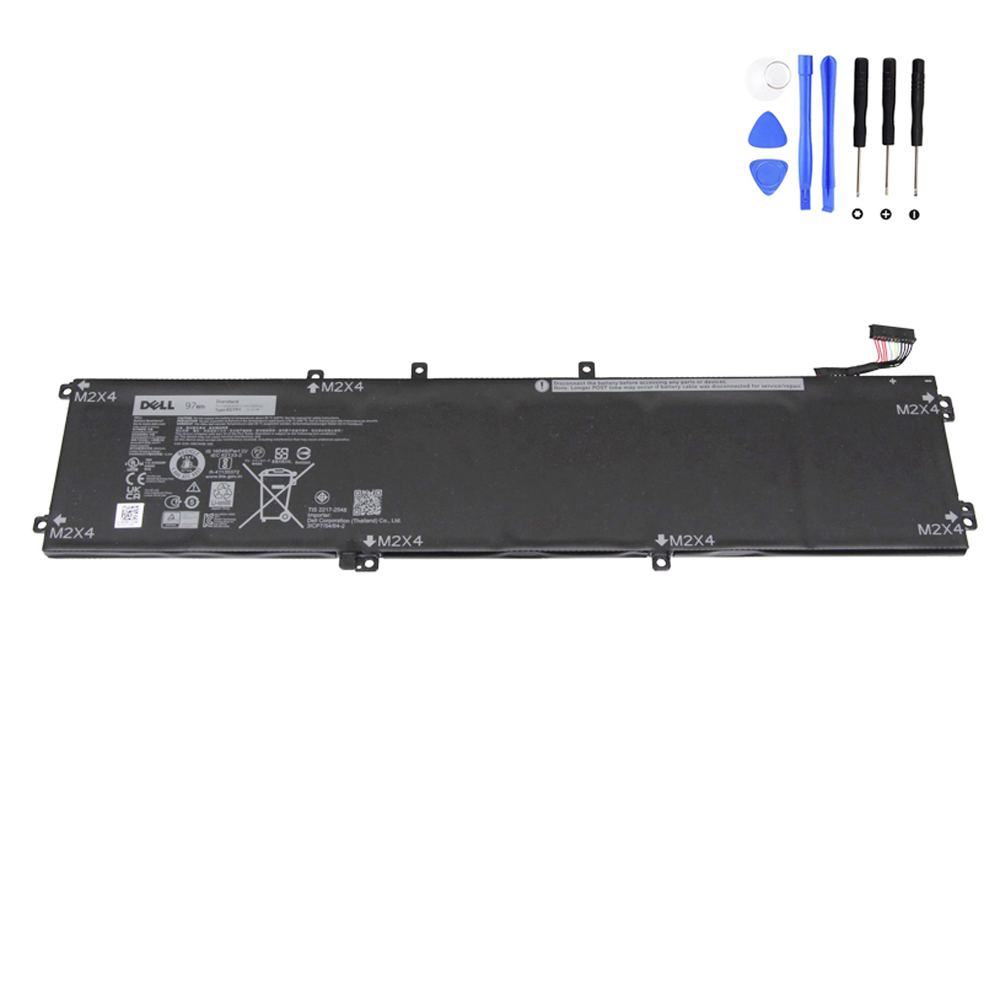
For example, if your Service Tag/battery label indicates part number 6GTPY and capacity around 97Wh,
you can use that exact identifier to select the correct listing.
Where to buy a compatible replacement
Browse our Dell battery collection here:
https://fixing-tools.store/laptop-parts/product-category/battery/battery-for-dell/
If your parts lookup confirms 6GTPY, you can view the compatible replacement here:
FAQ
Is replacing an XPS 15 battery usually worth it?
If your laptop is otherwise stable and fast enough, yes. Battery replacement often delivers the biggest improvement in daily usability per dollar.
When is buying a new laptop the better choice?
When you have battery issues plus major additional problems (port/screen/overheating/storage) or when the laptop no longer meets your performance needs.
How do I avoid ordering the wrong battery?
Match by Service Tag or the original battery part number first, then confirm Wh rating and connector/layout using product photos.
and are not affiliated with or endorsed by Dell Inc.