For many HP laptop owners, battery problems do not appear all at once. At first, the laptop may still work normally, but the runtime becomes shorter. Then charging becomes less stable, the battery percentage drops faster than before, or the laptop starts needing the charger almost all the time.
If your laptop uses the 41.04Wh HP HT03XL battery, one common question is simple: is it worth replacing it, or is it better to keep using the old battery or even replace the whole laptop?
In many cases, replacing the battery is absolutely worth it. If the laptop itself still meets your daily needs, a new battery can be one of the most cost-effective ways to restore mobility, improve daily convenience, and extend the useful life of the computer.
This article explains when replacing the HP HT03XL / L11119-855 battery makes sense, what problems a worn battery can cause, and what to check before you buy a replacement.
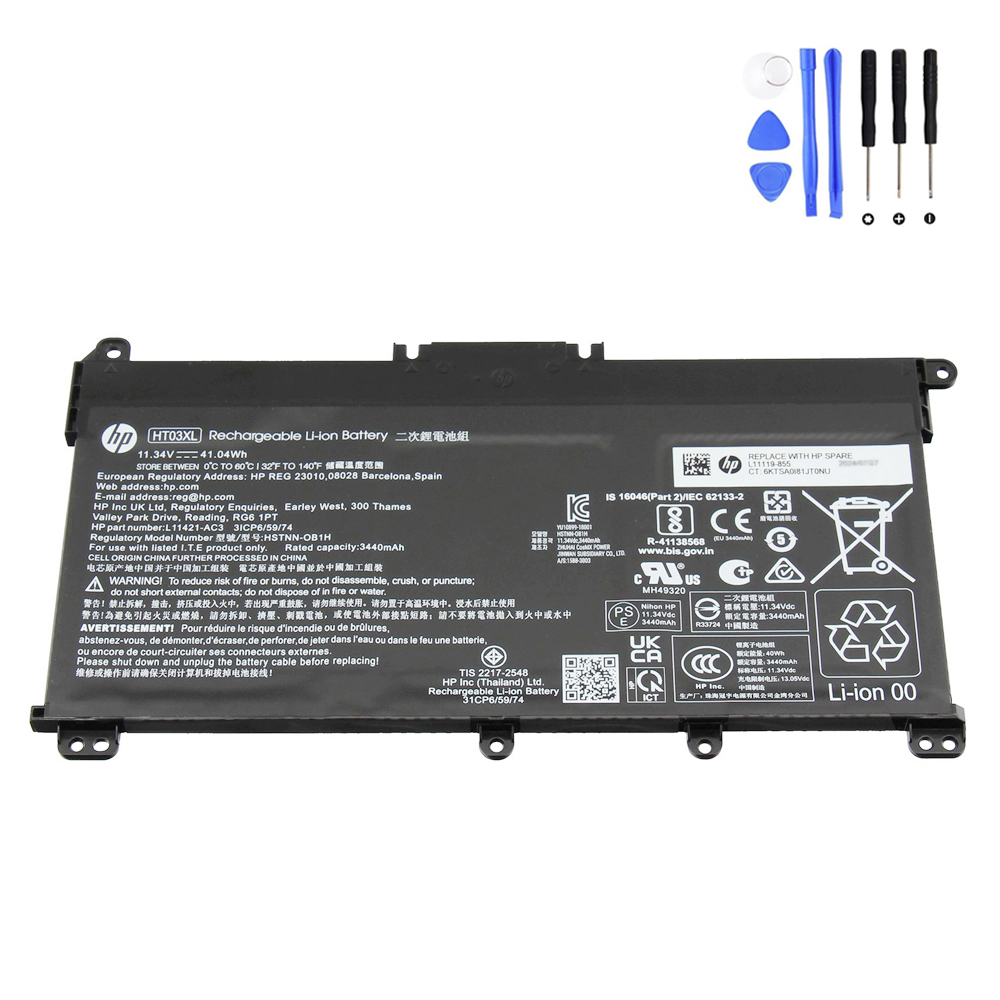
View HP HT03XL Battery L11119-855
What Is the HP HT03XL Battery?
The HP HT03XL is a built-in lithium-ion laptop battery used in a wide range of HP consumer and business-oriented laptop series. The battery in this listing has the following specifications:
- Battery Type: Built-in rechargeable laptop battery
- Capacity: 3600 mAh / 41.04 Wh
- Voltage: 11.4V
- Cells: 3-cell
- Condition: Brand New
- Package: 1 x Battery for HP + DIY Installation tools
- Warranty: 12 Months / 30-Day Return
This battery is associated with part numbers such as HT03XL, L11119-855, L11119-856, L11119-857, HT03041XL, HSTNN-DB8R, HSTNN-DB8S, HSTNN-LB8M, and many others.
When Is Replacing the Battery Worth It?
Replacing the battery is usually worth it when the laptop itself still performs well enough for your needs. A battery replacement makes the most sense in situations like these:
1. The Laptop Still Works Well, but the Battery Does Not
This is the most common situation. The laptop may boot quickly, run your usual software, and still have a good screen and keyboard, but the battery no longer provides normal runtime. In that case, the battery is often the weakest part of the system, not the laptop as a whole.
If your HP laptop still handles web browsing, office work, video calls, schoolwork, light business tasks, or home use without major issues, replacing the battery can be much cheaper than replacing the entire computer.
2. The Runtime Has Become Too Short
One of the clearest signs that replacement is worth considering is a major drop in battery life. If your laptop used to run for several hours but now lasts only a short time, daily usability drops sharply.
This is especially frustrating for people who need to use the laptop:
- in classrooms
- in meetings
- while traveling
- around the house without staying near a wall outlet
- during power interruptions or temporary unplugged use
A fresh HT03XL battery can restore much of the portability that made the laptop useful in the first place.
3. The Laptop Must Stay Plugged in All the Time
If your HP laptop has effectively turned into a desktop because the battery is too weak to rely on, replacement is often worth it. A laptop that only works comfortably when permanently connected to the charger loses one of its biggest advantages.
Even if you mostly use the laptop at a desk, a healthy battery still matters. It helps protect your work during accidental power interruptions and allows you to move the laptop without shutting it down every time.
4. The Battery Causes Charging or Stability Problems
A worn battery may do more than shorten runtime. It can also contribute to annoying real-world problems such as:
- battery percentage jumping unexpectedly
- sudden shutdowns at moderate charge levels
- charging that feels inconsistent or unusually slow
- system warnings related to battery health
- excessive heat during charging or use
When the old battery starts behaving unpredictably, replacing it is often a practical step toward improving reliability.
When Might Battery Replacement Not Be Worth It?
Although replacing the HP HT03XL is often worthwhile, there are cases where it may not be the best investment.
1. The Laptop Has Multiple Major Problems
If the laptop has a failing screen, damaged hinges, broken keyboard, charging port issues, serious motherboard faults, or performance that no longer meets even basic needs, replacing only the battery may not solve the bigger problem.
In that situation, it is better to evaluate the overall condition of the machine before spending money on any one part.
2. Your Workload Has Outgrown the Laptop
If your HP laptop is now too slow for your current tasks, such as heavy multitasking, modern design work, demanding business software, or newer development environments, a battery replacement will not change that. It restores mobility, but it does not turn an older laptop into a newer performance class.
So the real question is not only “is the battery bad?” but also “does this laptop still fit my current needs?”
3. The Existing Battery Problem Is Actually Something Else
Sometimes users assume the battery is the problem, but the real issue may be the charger, the charging port, the DC-in circuit, or software power settings. If the laptop does not charge at all, shows unstable charging behavior, or shuts down immediately even with a different known-good battery, further diagnosis may be needed.
Why the HT03XL Battery Is Often Worth Replacing
The HT03XL is used across a very broad range of HP laptop families, which means many of these machines are still actively used today for everyday work, study, and household computing. In many of these systems, the battery is one of the first major wear items to decline, long before the rest of the laptop becomes unusable.
That is exactly why replacement can be a smart decision. Instead of giving up on a working laptop because of poor battery life, you can replace one key consumable component and keep using the machine more comfortably.
What Problems Can an Old HT03XL Battery Cause?
As lithium-ion batteries age, their usable capacity declines. In practical terms, that can lead to several user-visible symptoms:
- much shorter battery life than before
- the need to charge more frequently
- battery drain during sleep or standby
- sudden drops from one charge percentage to another
- reduced confidence using the laptop away from power
Over time, battery wear changes how the laptop fits into everyday life. A machine that was once easy to carry from room to room or take on the road starts feeling restricted and inconvenient.
Who Should Consider Replacing This Battery?
Replacing the 41.04Wh HP HT03XL battery is often a good idea for:
- students who need dependable battery life for classes
- office users who move between desks or meeting rooms
- home users who want normal unplugged use again
- small business users who rely on stable daily productivity
- repair shops restoring customer laptops with weak runtime
- resellers refurbishing compatible HP laptops for resale
For these users, the value of replacement is not just technical. It is practical. A better battery makes the laptop easier to trust and easier to use.
Compatible Part Numbers
This replacement battery is compatible with many HP battery part numbers, including but not limited to:
HP L11119-856, HP 1588-3003, HP 3ICP6/59/74, HP 5LM85AV, HP HSTNN-1B80, HP HSTNN-DB8R, HP HSTNN-DB8S, HP HSTNN-DB9D, HP HSTNN-IB80, HP HSTNN-IB8O, HP HSTNN-LB8M, HP HSTNN-OB1L, HP HT03, HP HT03041XL, HP HT03045XL-P, HP HT03XL, HP L11119-855, HP L11119-856, HP L11119-857, HP L11421-1C1, HP L11421-1C2, HP L11421-271, HP L11421-2C1, HP L11421-2C3, HP L11421-422, HP L11421-423, HP L11421-542, HP L11421-545, HP L11421-546, HP L11421-AC2, HP L11421-AC3, HP L56025-AC1, HP L56424-005, HP L56424-AC1.
Compatible HP Laptop Model Series
This battery fits a wide range of HP laptop model series. Partial compatible series include:
HP 14-cf0000, HP 14-cf1000, HP 14-cf2000, HP 14-cf3000, HP 14-ck0000, HP 14-ck2000, HP 14-cm0000, HP 14-df0000, HP 14-dg0000, HP 14-dk0000, HP 14-dk1000, HP 14-dq0000, HP 14-fq0000, HP 14-ma0000, HP 14-ma1000, HP 14q-cs0000, HP 14q-cy0000, HP 14s-cf0000, HP 14s-cf3000, HP 14s-cr0000, HP 14s-cs1000, HP 14s-cs2000, HP 14s-dk0000, HP 14s-dp0000, HP 14s-dq0000, HP 14s-dq1000, HP 14s-dq2000, HP 14s-dq3000, HP 14s-dq5000, HP 14s-fq0000, HP 14s-fq1000, HP 14s-fq2000, HP 14t-dq100 CTO, HP 15-da0000, HP 15-da1000, HP 15-da2000, HP 15-da3000, HP 15-db0000, HP 15-db1000, HP 15-dw0000, HP 15-dw1000, HP 15-dw2000, HP 15-dw3000, HP 15-dw4000, HP 15-dy1000, HP 15-ef0000, HP 15-gw0000, HP 15q-ds0000, HP 15q-dy0000, HP 15s-du0000, HP 15s-eq0000, HP 15s-eq1000, HP 15s-eq2000, HP 15s-eq3000, HP 15s-fq0000, HP 15s-fq1000, HP 15s-fq2000, HP 15s-fq3000, HP 15s-fq4000, HP 15s-fq5000, HP 15t-dy100, HP 17-by0000, HP 17-by1000, HP 17-by2000, HP 17-by3000, HP 17-by4000, HP 17-ca0000, HP 17-ca1000, HP 17-ca2000, HP 17q-cs1000, HP 17t-by000, HP 17z-ca200, HP 240 G7, HP 240 G8, HP 245 G7, HP 245 G8, HP 246 G7, HP 250 G7, HP 250 G8, HP 255 G7, HP 256 G7, HP 340 G5, HP 340 G7, HP 348 G7, HP 470 G7, HP Envy 15-ep0000, HP Envy x360 15-cn1000, HP Envy x360 15-cn1600, HP Envy x360 15-cn1800.
What Makes This Replacement Package More Practical?
One useful detail in this package is that it includes DIY installation tools. That matters because many HT03XL-compatible HP laptops use an internal battery design rather than an external quick-release battery. For users comfortable opening the bottom cover and following careful installation steps, included tools can make the replacement process more convenient.
The package also includes a 12-month warranty and a 30-day return policy, which helps reduce buying risk.
Should You Replace the Battery or Buy a New Laptop?
For many users, replacing the HT03XL battery makes sense when the laptop still performs well enough for daily use. A battery replacement is usually far less expensive than replacing the whole computer, and the improvement in day-to-day convenience can be immediate.
If the laptop still has:
- a good display
- reliable charging behavior
- acceptable speed for your work
- a solid keyboard and touchpad
- no major hardware damage
then replacing the battery is often the smarter choice.
On the other hand, if the laptop is already suffering from several expensive problems at once, then the battery alone may not justify further investment.
Final Verdict
Yes, in many cases it is worth replacing the 41.04Wh HP HT03XL Battery L11119-855.
If your HP laptop is still useful but the battery life has become poor, unstable, or too limiting for daily life, replacing the battery can be one of the most effective and affordable ways to extend the life of the machine.
The key is to make sure the replacement matches the correct part numbers and compatible model series. If your laptop falls within the supported range and the rest of the system is still in good condition, a new HT03XL battery can bring back the portability and convenience that the laptop has gradually lost.