If you own an HP Pavilion, Envy, Spectre, EliteBook, ProBook or HP 14/15/17 series laptop, there’s a good chance it was shipped with a
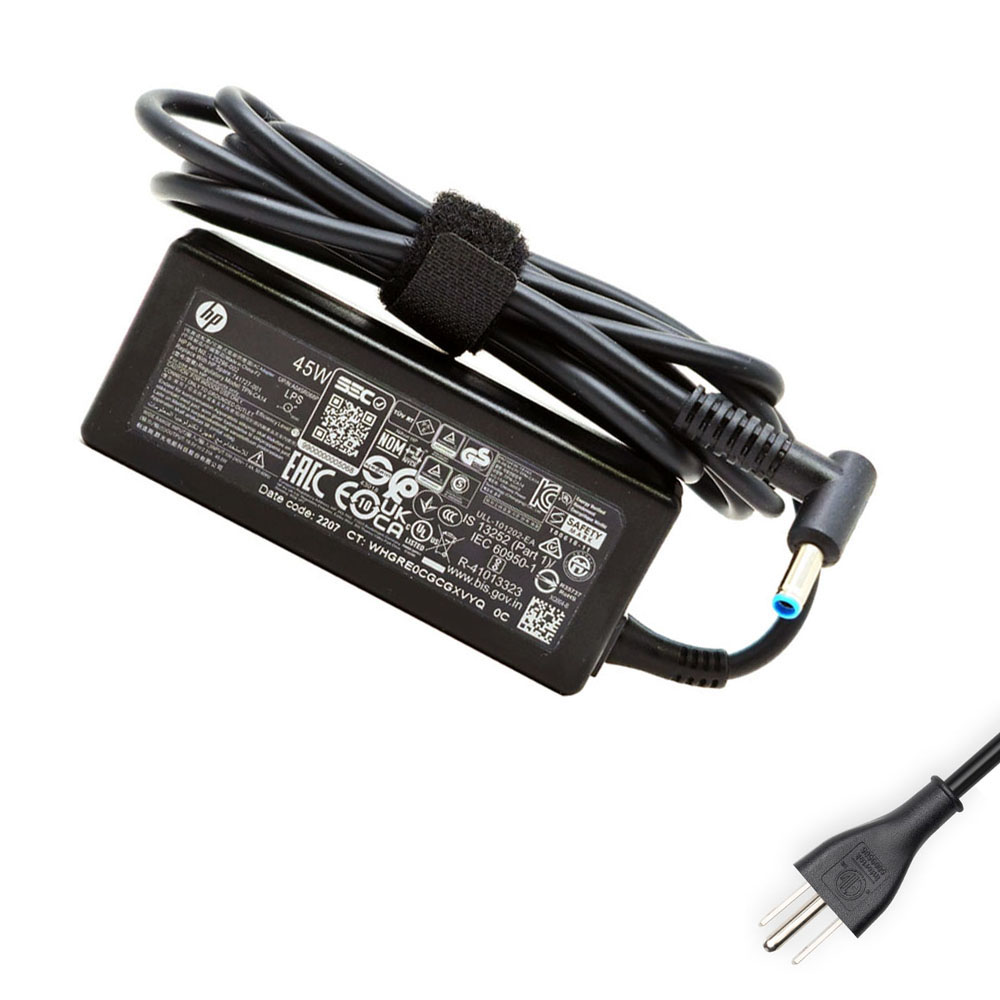
19.5V 2.31A 45W charger using the slim 4.5 × 3.0 mm blue-tip connector.
This compact adapter is designed for everyday notebooks and ultrabooks – light, portable and efficient.
But once the original charger gets lost, damaged or starts failing, replacing it can be confusing:
- There are multiple voltages (18.5V, 19V, 19.5V, 20V) on the market.
- HP uses both 7.4 × 5.0 mm and 4.5 × 3.0 mm barrel plugs.
- Many generic adapters look similar but are not electrically correct.
In this guide, we look at what the 19.5V 2.31A 45W HP 4.5 × 3.0 mm AC adapter actually is, which HP laptops it supports,
and how to confirm that it’s the right replacement for your device.
1. Typical problems when your HP 45W charger is failing
Most users realise they have a charger problem when they see one or more of these symptoms:
Battery and charging issues
- The laptop only charges when it is shut down or in sleep mode.
- Windows shows “plugged in, not charging” or the percentage doesn’t increase.
- The charging LED on the laptop blinks or does not turn on consistently.
Performance drops while plugged in
- Applications feel slow, even though the laptop is connected to AC power.
- The CPU throttles or the system becomes laggy when you open more programs.
Physical signs of damage
- The cable is frayed near the plug or power brick.
- The adapter makes buzzing noises or becomes unusually hot.
- The blue DC tip feels loose inside the laptop’s charging port.
Using a damaged or under-rated adapter is not only inconvenient – it can damage your battery over time.
A correct 45W replacement with the proper voltage and connector solves these problems safely.
2. Product overview: 19.5V 2.31A 45W HP 4.5 × 3.0 mm adapter
This compact HP-compatible adapter is designed as a direct replacement for many original 45W HP chargers.
It uses the slim 4.5 mm (outer) × 3.0 mm (inner) barrel connector – often called the “small blue tip” –
that HP uses on a wide range of consumer and business laptops.
- Item condition: Brand new
- Input: 100–240V ~ 50–60Hz (worldwide mains support)
- Colour: Black
- Output voltage: 19.5V DC
- Output current: 2.31A
- Output power: 45W
- Connector size: 4.5 × 3.0 mm barrel plug
- Package: 1 × HP-compatible charger + 1 × power cord (plug type matched to your country)
- Warranty: 12-month warranty and 30-day return policy
Important: this is a high-quality compatible replacement adapter for HP laptops, not an original HP-branded charger.
3. Supported HP part numbers
HP often uses different spare part numbers and FRU codes for chargers that are electrically identical.
This 19.5V 2.31A 45W adapter is designed to replace a wide range of HP 45W adapters, including (but not limited to):
720987-800, 721092-001, 734734-001, 740015-001/002/003, 741553-800/850/852, 741727-001/B,
742436-001, 744499-001, 744892-001, 845612-001, 845837-850, 853490-001, 854054-001/002/003/004,
856948-002, 920306-015, A045R07DH, ADP-45FE B, ADP-45FE FA, H6Y88AA, H6Y88AA#ABA, H6Y88AA#UUZ,
HSTNN-CA40, HSTNN-DA40, HSTNN-LA35, HSTNN-LA40, L25296-001/002/003, M46472-001, NT454H,
PA-1450-36HE, TPN-DA16, TPN-LA03,
608423-001, 609938-001, 613151-001, 683509-002/003, 693717-001, 696607-001, 696694-001,
744481-002, 744893-001/B, A040R00DL, A045R00DH, H5W93AA, H5W93AA#ABB, H6Y88AA#ABB, HSTNN-CA17, HSTNN-DA17,
NT45HP, PA-1450-32HJ…
If your original adapter’s label shows one of these codes alongside 19.5V and 45W, this replacement charger is designed to be compatible.
4. Compatible HP laptop families (partial list)
This 45W 4.5 × 3.0 mm adapter supports a very broad range of HP consumer and business laptops, such as:
- HP 11 / 14 / 15 / 17 – including HP 14s, 14t, 15s, 15t, 15z, 17 series
- HP 240 / 245 / 250 / 255 / 256 / 348 / 470 – G4, G6, G7, G8, G9, G10 and related variants
- HP Chromebook – Chromebook 11, Chromebook 13 G1, Chromebook 14 / 14a
- HP Compaq & Pavilion – Compaq 15, Pavilion 11 / 13 / 15 / 17, Pavilion x360 11/13/14/15, TouchSmart 15
- HP Envy – Envy 13/13t, 15/15t/15z, 17/17t, Envy M6, Envy x2 15, Envy x360 (13, 13m, 15, 15m, m6 series)
- HP Spectre – Spectre 13, Spectre 13 x2 Pro, Spectre Pro x360 G1/G2, Spectre x360 13/13t/14/15
- HP EliteBook & ElitePad – 720/725/740/745/750/755 G-series, 820 G1, 840R G4, 850 G1/G2/G5, EliteBook x360 830 G5, Revolve 810 G2/G3, ElitePad 900/1000 and mobile POS solutions
- HP ProBook – ProBook 430/440/445/450/455/630/635/640/650 series (G1–G10, Aero, Fortis, x360 variants)
- HP Pro / Stream / Slate / Split / mt / ZBook – Pro x360 435, Stream 11/13/14 (and Pro/x360 variants), Slate 17, SlateBook 14, Split 13/13t, mt-series thin clients, ZBook 14, ZBook 15 G6 (45W configs)
- HP Victus / Victurs (certain configurations) – some lower-power Victus 16 models that ship with a 45W adapter
Because HP updates its model lines frequently, always use the compatibility checklist below instead of relying only on the series name.
5. Compatibility checklist: is this 45W charger right for your HP laptop?
1) Check the output voltage and wattage
- On your original adapter, find the line that starts with Output.
- Confirm that it states roughly 19.5V and 2.31A (or clearly marked as 45W).
- If your original charger is 65W, 90W or higher, this 45W unit may not be suitable for full performance.
2) Confirm the connector size – 4.5 × 3.0 mm
- HP uses two main barrel-plug sizes: the larger 7.4 × 5.0 mm and the smaller 4.5 × 3.0 mm blue tip.
- This adapter uses the small 4.5 × 3.0 mm barrel. Visually compare your current plug with the product photos – the tip and thickness should match.
3) Match HP spare part / FRU number
- Look for an HP spare part number such as 740015-001, H6Y88AA, ADP-45FE B or any of the codes listed above.
- If your part number appears in the compatibility list, that is a strong indication this 45W adapter is a correct replacement.
4) Verify with your exact model name
- Check the label on the bottom of your laptop or in BIOS/HP Support Assistant for the exact model (for example HP Pavilion x360 14m, HP ProBook 445 G8, HP Envy x360 13).
- Ensure your series appears under the compatible model list and is specified to use a 45W 19.5V adapter.
If you are unsure at any point, take a photo of your original adapter label and the model sticker on your laptop and share them with support.
This avoids ordering the wrong charger and speeds up the replacement process.
6. Why a correct 45W adapter matters for your HP laptop
It may be tempting to use any adapter that “kind of fits”, but using the wrong voltage or connector can cause:
- charging failures and “plugged in, not charging” messages,
- slow performance or random shutdowns under load,
- excess heat and stress on the power circuitry, and
- long-term battery damage or greatly reduced lifespan.
A properly rated 19.5V 2.31A 45W adapter with a 4.5 × 3.0 mm plug ensures that your HP notebook runs within its design limits,
charging the battery safely and delivering stable performance for everyday tasks, online meetings and light productivity.
7. Summary
If your HP laptop originally shipped with a 45W small blue-tip charger, this
19.5V 2.31A 45W HP 4.5 × 3.0 mm AC adapter is an excellent replacement option.
By confirming:
- the correct voltage (19.5V) and power rating (45W),
- the connector size (4.5 × 3.0 mm),
- your HP spare part number, and
- your exact model series,
you can safely restore reliable charging and everyday performance to your HP notebook, without the risks associated with random or under-rated third-party adapters.