Many HP laptop users only start thinking about the battery when everyday tasks become frustrating:
the laptop dies much faster than before, the percentage drops suddenly from 40% to 10%, or the
machine shuts down during an online meeting even though Windows says there’s still charge left.
If this sounds familiar and your HP notebook uses an HT03XL battery, it may be
time to replace it.
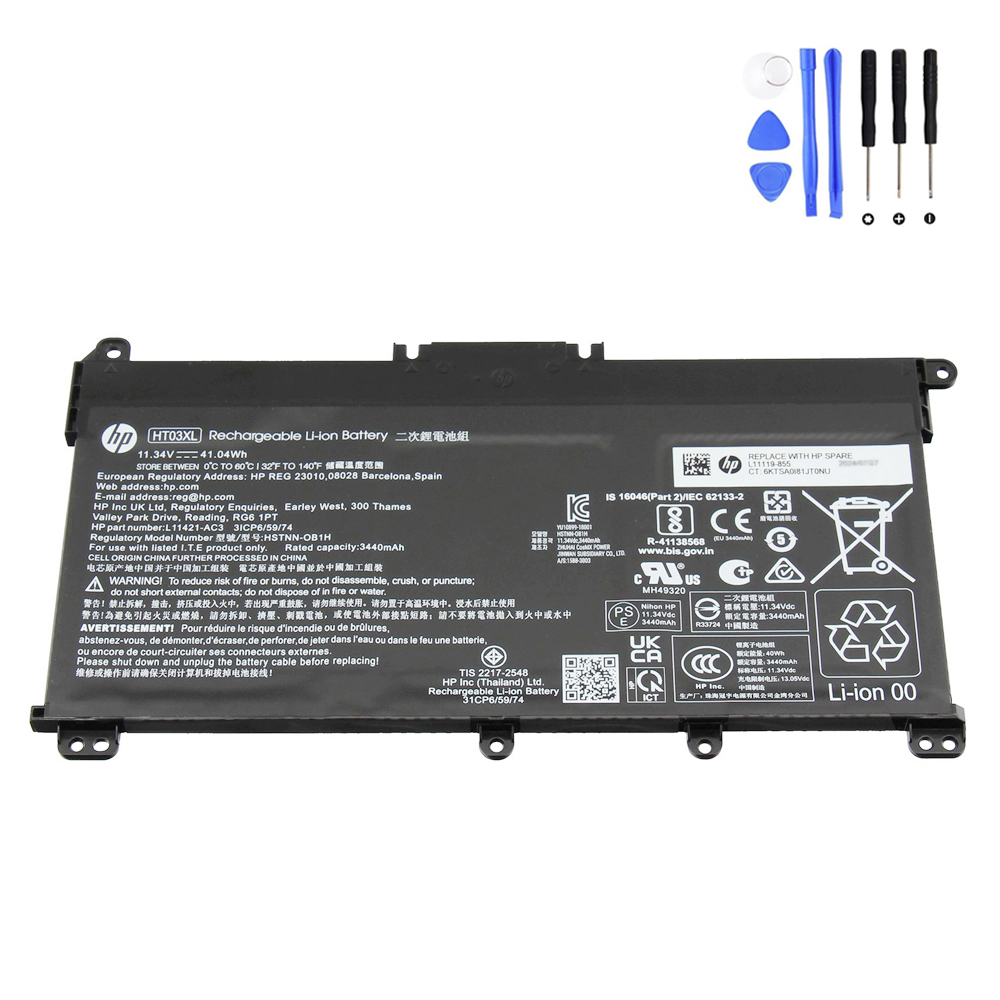
41.04Wh HP HT03XL Replacement Battery (11.4V, 3600mAh, 3-cell)
Brand new 41.04Wh (3600mAh, 11.4V) battery designed for a wide range of HP 14-, 15- and 17-inch
laptops, as well as HP 240/245/250 series and selected HP Envy / Envy x360 models. This battery
fits HT03XL systems only – it is not a replacement for
HP LG04XL.
Need a different HP battery? Browse our
Battery for HP
category to find the right model for your laptop.
In this guide, we’ll look at the typical symptoms of a failing HT03XL battery, how to confirm
that your battery is the real problem, and what you should pay attention to before ordering and
installing a replacement—especially the important difference between
HT03XL and LG04XL.
Quick navigation
- 1. Common symptoms of a failing HP HT03XL battery
- 2. How to confirm your battery is the issue (not the charger or Windows)
- 3. HT03XL vs LG04XL – why the correct part number matters
- 4. Inside the 41.04Wh HP HT03XL replacement battery
- 5. Typical HP laptop models using the HT03XL battery
- 6. Replacement options: DIY vs professional service
- 7. How to care for your new HT03XL battery
1. Common symptoms of a failing HP HT03XL battery
Lithium-ion batteries in everyday laptops normally last several years, depending on how you use
your machine. They rarely fail overnight; instead, you’ll notice gradual changes in battery
behavior. Owners of HP 14-, 15- and 17-inch notebooks that use an HT03XL battery often report
the following issues:
1.1 Rapid battery drain
- Your HP laptop used to last 4–6 hours on light use; now it lasts 1–2 hours at best.
- The percentage falls quickly once it drops below 50%.
- Browsing the web or watching a short video consumes a large chunk of the remaining charge.
This usually means the real capacity of the battery cells is much lower than the original
41.04Wh. Windows still tries to estimate runtime, but with worn-out cells those estimates are no
longer reliable.
1.2 Sudden shutdowns with charge still remaining
- The laptop powers off abruptly with 20–30% still showing in the battery icon.
- Restarting the machine shows a much lower percentage than before the shutdown.
- Shutting the lid or moving the laptop can trigger a shutdown when the battery is low.
Under load, a weak cell can no longer maintain stable voltage. The protection circuit inside the
pack cuts power to prevent damage, which feels like a random shutdown to the user.
1.3 “Plugged in, not charging” or battery stuck at a fixed percentage
- Windows shows “Plugged in, not charging” for long periods.
- The charge never goes above, for example, 80%, no matter how long you leave it plugged in.
- The laptop works normally on AC power but dies quickly if you unplug the adapter.
Sometimes this behavior is caused by power-saving settings or a faulty adapter, but if the power
supply is OK and the problem persists, it often means the HT03XL charge controller is limiting
charging because of worn cells.
1.4 Extra heat and noisy fan during simple tasks
- The underside or palm rest area feels warmer than before, even when just browsing.
- The fan comes on more frequently and stays on longer during light workloads.
A heavily degraded battery can generate more heat during charging and discharging. Combined with
dust or background processes, it can make the laptop feel hotter overall.
1.5 Swelling or changes in the case
- The touchpad feels raised or does not click as smoothly.
- You notice a slight bulge in the bottom cover or a gap along the palm rest.
Swelling is a serious safety warning. If your HT03XL pack is expanding, you should stop using the
laptop on battery power and plan for an immediate replacement to avoid further damage.
2. How to confirm your battery is the issue (not the charger or Windows)
Before ordering a new HT03XL battery, it’s a good idea to confirm that the battery itself is the
problem. Here are simple checks you can perform at home:
2.1 Test with a known-good adapter
- Use the original HP charger for your laptop, or a genuine compatible adapter.
- Inspect the plug, cable and DC jack for damage or looseness.
- Check if the charging LED behaves normally when you plug in the adapter.
If a known-good adapter doesn’t improve charging or runtime, the fault is more likely inside
the battery pack.
2.2 Generate a Windows battery report
On Windows 10/11, you can generate a built-in battery report:
- Open Command Prompt as Administrator.
- Type
powercfg /batteryreportand press Enter. - Open the generated HTML file (usually in your user folder).
Compare Design Capacity with Full Charge Capacity. If the full
charge capacity is far below the design capacity, your battery has experienced significant wear.
2.3 Check in BIOS/UEFI and HP diagnostics (if available)
- Enter BIOS/UEFI and look for battery health or status information.
- Use any HP diagnostics tool provided for your model to test the battery.
When these reports show low capacity or “replace battery” messages—and you have already checked
the adapter—replacing the HT03XL pack is usually the right next step.
3. HT03XL vs LG04XL – why the correct part number matters
HP uses several different batteries that may look similar from the outside, but they are
not interchangeable. For this product, there is one critical compatibility note:
This replacement battery is for HT03XL laptops only.
It cannot be used as an alternative to the HP LG04XL battery.
Before ordering, remove the bottom cover (or check your existing documentation) and confirm that
the printed part number on your original battery is one of the compatible
numbers, especially HT03XL, L11119-855, L11119-856
or one of the other matching codes listed on the product page.
If your current battery shows LG04XL or another part number that is not in the
compatible list, please do not order this HT03XL replacement. Instead, search in
our
Battery for HP
category for a pack that matches your model exactly.
4. Inside the 41.04Wh HP HT03XL replacement battery
The HT03XL is a compact, 3-cell lithium-ion pack used in many entry-level and mid-range HP
notebooks. A high-quality replacement should match the original voltage and capacity to keep the
laptop stable and safe.
4.1 Key specifications
| Item | Specification |
|---|---|
| Condition | Brand New replacement battery |
| Color | Black |
| Capacity | 3600mAh / 41.04Wh |
| Voltage | 11.4V |
| Number of cells | 3-cell lithium-ion pack |
| Warranty | 12-month warranty with 30-day return policy |
| Package includes | 1 × battery for HP (HT03XL) |
4.2 Compatible part numbers (selection)
A properly designed HT03XL replacement is compatible with many HP part numbers, including
(not a full list):
- HP HT03XL, HT03, HT03041XL, HT03045XL-P
- HP L11119-855, L11119-856, L11119-857
- HP L11421-1C1, L11421-1C2, L11421-271
- HP L11421-2C1, L11421-2C3, L11421-422, L11421-423
- HP L11421-542, L11421-545, L11421-546
- HP HSTNN-DB8R, HSTNN-DB8S, HSTNN-DB9D, HSTNN-IB80
- HP L56424-005, L56424-AC1, L56025-AC1 and others
5. Typical HP laptop models using the HT03XL battery
The HT03XL battery is used across a wide range of HP consumer and business models, including many
14-, 15- and 17-inch notebooks and several G-series devices. Common families include (partial list):
5.1 HP 14-inch series
- HP 14-cf0000 / 14-cf1000 / 14-cf2000 / 14-cf3000
- HP 14-ck0000 / 14-ck2000
- HP 14-cm0000, 14-df0000, 14-dg0000, 14-dk0000 / 14-dk1000
- HP 14-dq0000, 14-fq0000, 14-ma0000 / 14-ma1000
- HP 14q-cs0000, 14q-cy0000
- HP 14s-cf0000 / 14s-cf3000
- HP 14s-cr0000, 14s-cs1000 / 14s-cs2000
- HP 14s-dk0000, 14s-dp0000, 14s-dq0000 / 14s-dq1000 / 14s-dq2000 / 14s-dq3000 / 14s-dq5000
- HP 14s-fq0000 / 14s-fq1000 / 14s-fq2000
5.2 HP 15-inch and 17-inch series
- HP 15-da0000 / 15-da1000 / 15-da2000 / 15-da3000
- HP 15-db0000 / 15-db1000
- HP 15-dw0000 / 15-dw1000 / 15-dw2000 / 15-dw3000 / 15-dw4000
- HP 15-dy1000, 15-ef0000, 15-gw0000
- HP 15q-ds0000, 15q-dy0000
- HP 15s-du0000
- HP 15s-eq0000 / 15s-eq1000 / 15s-eq2000 / 15s-eq3000
- HP 15s-fq0000 / 15s-fq1000 / 15s-fq2000 / 15s-fq3000 / 15s-fq4000 / 15s-fq5000
- HP 17-by0000 / 17-by1000 / 17-by2000 / 17-by3000 / 17-by4000
- HP 17-ca0000 / 17-ca1000 / 17-ca2000 / 17z-ca200 / 17q-cs1000
5.3 HP business and Envy series (selection)
- HP 240 G7 / 240 G8 / 245 G7 / 245 G8 / 246 G7
- HP 250 G7 / 250 G8 / 255 G7 / 256 G7
- HP 340 G5 / 340 G7 / 348 G7 / 470 G7
- HP Envy 15-ep0000
- HP Envy x360 15-cn1000 / 15-cn1600 / 15-cn1800
If your laptop is in these series and your original battery is labeled HT03XL (or one of the
compatible part numbers), the
41.04Wh HT03XL replacement battery
is designed for your machine.
6. Replacement options: DIY vs professional service
Many HP laptops that use the HT03XL have removable bottom covers secured with screws. Replacing
the battery is usually straightforward for users comfortable with basic tools, but you should
still work carefully.
6.1 Typical HT03XL replacement steps
- Shut down the laptop completely and unplug the charger.
- Remove all screws from the bottom cover and gently lift it off.
- Locate the HT03XL battery and disconnect the battery cable from the motherboard.
- Remove the screws holding the battery and lift the old pack out.
- Place the new 41.04Wh HT03XL battery, secure it with screws and reconnect the cable.
- Reinstall the bottom cover, tighten the screws and test the laptop on battery power.
If you are not comfortable opening your laptop, you can order the correct battery and ask a
professional repair shop or local technician to perform the installation. You provide the
genuine-spec battery; they provide the labor.
7. How to care for your new HT03XL battery
After installing a new HT03XL battery, a few simple habits will help you get the longest possible
life out of it:
-
First few cycles: Use the laptop on battery and let it cycle between about
20% and 90% to help Windows and the battery controller “learn” the new capacity. -
Avoid long periods at 0% or 100%: It’s fine occasionally, but try not to leave
the laptop fully drained or fully charged for days at a time. -
Keep it cool: Use the laptop on a hard surface, keep vents clear and avoid
overheating, which accelerates battery wear. -
Smart storage: If you won’t use the laptop for several weeks, store it at
around 40–60% charge in a cool, dry place.
With a fresh 41.04Wh HT03XL battery and good charging habits, your HP laptop can once again
deliver reliable runtime for study, work or everyday use—without worrying about sudden shutdowns
or being tied to the charger all the time.
Replace your worn HT03XL battery and restore your HP laptop’s runtime