The HP FM08 battery is used in many HP Omen 17 gaming laptops.
On the label it often only says “FM08”, so many customers naturally think
“as long as it is FM08, it will fit my laptop”.
Unfortunately, this is not always true.
In reality there are two different HP FM08 battery versions:
a 12-pin connector type and a 16-pin connector type.
They look almost identical in shape and size, but the plug at the end of
the cable is different.
If you accidentally buy the wrong connector type, the battery simply
cannot be plugged into your motherboard.
Before you order an FM08 replacement battery, always check the connector on your original battery:
does it have 12 pins or 16 pins?
Then choose the matching product below:
- 16-pin, 86Wh: 86Wh HP FM08 16-Pin Battery
- 12-pin, 83.22Wh: 83.22Wh HP FM08 12-Pin Battery
1. Two FM08 versions: 12-pin vs 16-pin
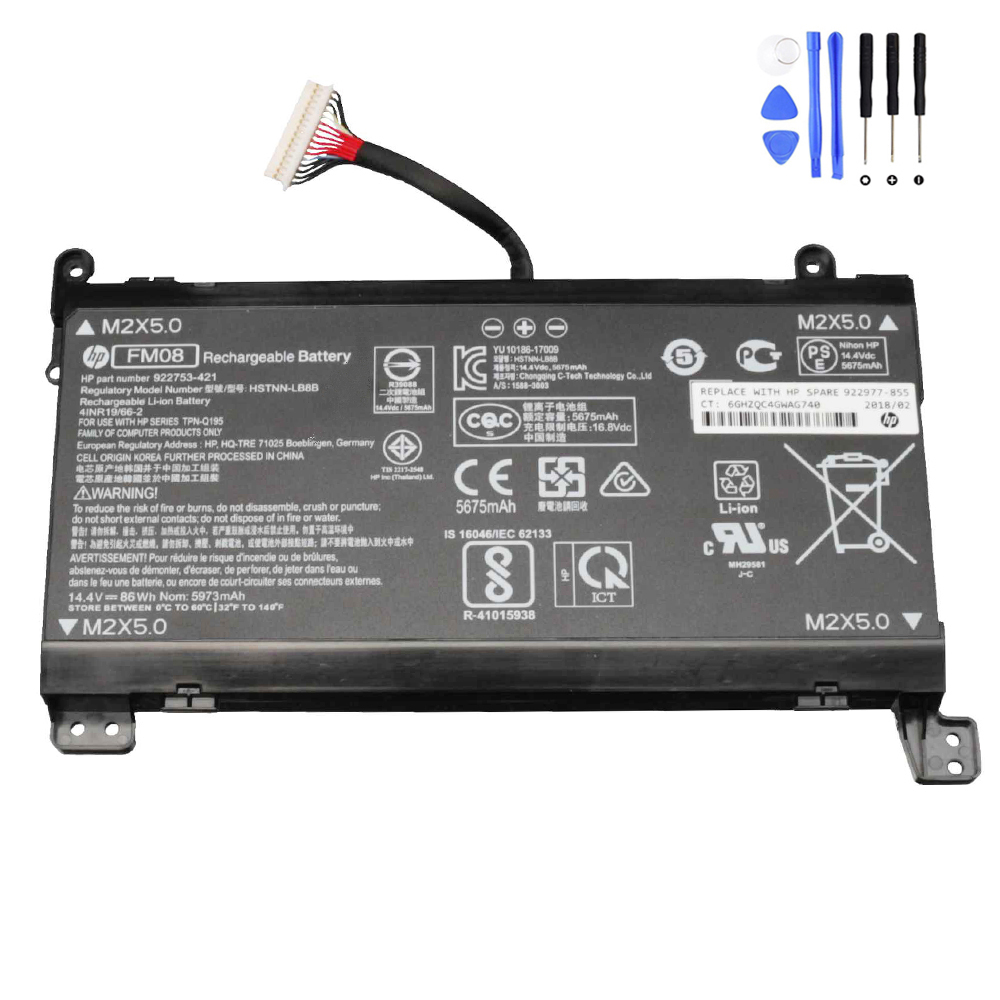
FM08 16-Pin – 86Wh high-capacity version
This version is the 86Wh / 14.4V HP FM08 battery with a 16-pin connector.
It is a high-capacity pack designed for longer runtime.
- Capacity: 5973 mAh / 86 Wh
- Voltage: 14.4 Volts
- Cells: 8-cell Li-ion
- Connector: 16-pin plug
Common part numbers (not complete):
- HP 922753-421
- HP 922977-855
- HP FM08 16Pin
- HP HSTNN-LB8B
- HP TPN-Q195
- HP-FM08-86Wh16PIN
You can see our 16-pin model here:
86Wh HP FM08 16-Pin Battery
.
FM08 12-Pin – 83.22Wh version
The second version is the 83.22Wh / 14.6V HP FM08 battery with a 12-pin connector.
It has slightly lower capacity but is still an 8-cell pack.
- Capacity: 5700 mAh / 83.22 Wh
- Voltage: 14.6 Volts
- Cells: 8-cell Li-ion
- Connector: 12-pin plug
Common part numbers (not complete):
- HP 922752-421
- HP 922976-855
- HP FM08 12Pin
- HP HSTNN-LB8A
Our 12-pin model is here:
83.22Wh HP FM08 12-Pin Battery
.

2. Why so many customers order the wrong FM08 battery
We see the same story again and again:
a customer knows that their original battery is “HP FM08” and that their laptop is an
“HP Omen 17-anxxx”, so they quickly order an FM08 replacement online.
When the new battery arrives, the plug does not fit the motherboard socket at all.
The main reasons are:
-
Part number confusion: different full part numbers
(922752-421 vs 922753-421, 922976-855 vs 922977-855, etc.)
still share the same FM08 code on the label. -
Connector is easy to overlook: if you only compare the big black battery pack,
the two versions look almost identical – the difference is only at the small white plug. -
Online listings sometimes only say “FM08”: not every listing clearly highlights
“12-Pin” or “16-Pin”. If you buy based only on “FM08” and “Omen 17-an000”,
it is very easy to pick the wrong one.
That is why we always emphasise in our product pages and images that you must
check the connector on your original battery before ordering.
3. How to check which HP FM08 battery you need
Follow these steps before placing your order:
Step 1 – Power off and open the bottom cover
- Shut down your HP Omen laptop completely.
- Unplug the AC adapter and any external devices.
- Remove the bottom cover according to the service manual or a reliable guide.
Step 2 – Find the label and part numbers
- Look for the original battery label with “FM08” printed on it.
- Near the FM08 code, you will often see another part number such as
922753-421, 922977-855 (usually 16-pin) or
922752-421, 922976-855 (usually 12-pin).
Step 3 – Inspect the connector carefully
- Follow the battery cable to the white plug that connects to the motherboard.
- Count the golden contact positions, or compare the shape with product photos.
-
If you see 12 pins → you need the
83.22Wh HP FM08 12-Pin Battery
. -
If you see 16 pins → you need the
86Wh HP FM08 16-Pin Battery
.
Step 4 – Double-check before closing your laptop
- Take a photo of the connector and label – this is useful if you want to
ask our support team to confirm compatibility. - Only after you are sure about the pin count and part number, place the order.
4. Which FM08 version is better for you?
If your laptop originally shipped with the 83.22Wh 12-pin battery, you may wonder:
“Can I upgrade to the 86Wh 16-pin version?”
In general, you must follow the original connector type.
The motherboard socket is designed either for 12 pins or for 16 pins; they are not cross-compatible.
Within the same connector type, a higher Wh rating usually means longer runtime.
So if your original battery is 86Wh 16-pin, you should replace it with the same spec.
If it is 83.22Wh 12-pin, you should use the matching 12-pin replacement.
5. Our HP FM08 replacement options
86Wh HP FM08 16-Pin Battery
High-capacity 86Wh pack for selected HP Omen 17-an series.
Ideal if your original battery label shows part numbers like 922753-421 or 922977-855,
and your connector has 16 pins.
83.22Wh HP FM08 12-Pin Battery
83.22Wh FM08 battery with 12-pin connector, compatible with HP Omen 17-an models
that originally used part numbers like 922752-421 or 922976-855.
6. Need help identifying your FM08 battery?
If you are not sure whether your HP Omen 17 uses the 12-pin or 16-pin FM08 battery,
feel free to contact us.
Take a clear photo of your original battery label and the connector, and send it to our support team.
We will help you confirm the correct replacement, so you do not have to worry about
ordering the wrong battery again.
With just a few minutes of checking, you can choose the correct HP FM08 replacement the first time
and enjoy a fresh, long-lasting battery for your gaming laptop.