If your Dell XPS 15 battery no longer lasts as long as it used to, choosing a replacement may seem simple at first. Many buyers search by laptop model, click the first result that looks close, and place an order. Unfortunately, that approach often leads to the wrong battery.
That is especially true for the Dell XPS 15 9560, 9570, and 7590 series. These laptops may use different battery configurations depending on the internal storage setup. Some use a smaller battery, while others use the larger 97Wh Dell 6GTPY battery. To order the correct replacement, you need to check more than the laptop name. You should verify the original battery model, battery capacity, storage layout, voltage class, and physical battery shape before buying.
This guide explains how to identify the correct battery for Dell XPS 15 9560, 9570, and 7590, how to tell whether your laptop uses the larger 97Wh battery or the smaller version, and how to avoid one of the most common Dell battery replacement mistakes.
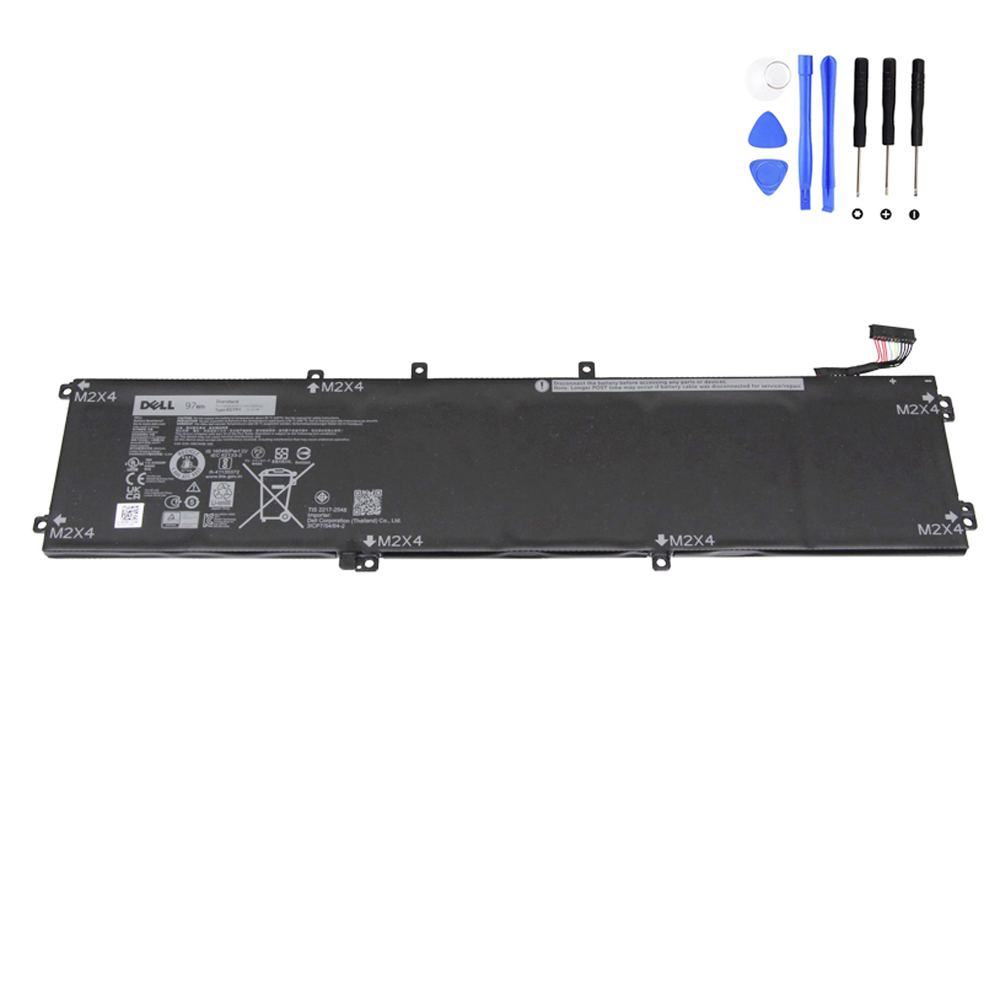
View the 97Wh Dell 6GTPY Battery Product Page
Why Battery Identification Matters on Dell XPS 15
The Dell XPS 15 series is known for combining slim design with powerful hardware. These machines are used for demanding work such as photo editing, video editing, design, development, multitasking, and professional travel. Because of this performance-oriented design, Dell used more than one internal battery arrangement across certain XPS 15 generations.
That means two laptops with very similar names may not always use the same battery configuration. Buyers who search only for “Dell XPS 15 battery replacement” often overlook the most important detail: whether the laptop is built around the smaller battery layout or the larger 97Wh battery layout.
If you skip that step, you may receive a battery that does not match your system’s internal space configuration.
The High-Capacity Option: 97Wh Dell 6GTPY
For many Dell XPS 15 9560, 9570, and 7590 users, the correct replacement battery is the 97Wh Dell 6GTPY battery. On your product page, this battery is listed with the following specifications:
- Battery model: Dell 6GTPY
- Capacity: 8500mAh / 97Wh
- Voltage: 11.4V
- Cell count: 6-cell
- Battery type: internal replacement battery
Your page also lists several related compatible part numbers, including:
- 6GTPY
- 5XJ28
- 05XJ28
- GPM03
- 06GTPY
- 451-BBYB
- AA309934
These references are useful because some buyers search by the part number printed on the old battery, while others search by a Dell-compatible code shown in a replacement listing.
Compatible Laptop Models for the 6GTPY Battery
According to your product page, the 97Wh 6GTPY battery is compatible with the following series:
- Dell XPS 15 (9560)
- Dell XPS 15 (9570)
- Dell XPS 15 (7590)
- Dell Precision 15 (5520)
- Dell Precision 15 (5530)
- Dell Precision 15 (5540)
- Dell Inspiron 15 (7501)
- Dell Inspiron 15 (7590)
- Dell Inspiron 15 (7591)
- Dell Vostro 15 (7500)
- Dell Vostro 15 (7590)
For this article, the main focus is the Dell XPS 15 9560, 9570, and 7590 family, because these are some of the most common search targets for this battery model.
Step 1: Check the Original Battery Label
The safest and most direct way to identify the correct replacement is to inspect the battery currently installed in your laptop. If the original label is still readable, look for:
- The battery part number, such as 6GTPY
- The battery capacity, such as 97Wh
- The voltage rating, such as 11.4V
- The cell count, such as 6-cell
- Any related compatible codes such as 5XJ28 or GPM03
If your battery label clearly shows 6GTPY, then your replacement path is straightforward. In that case, a matching 97Wh 6GTPY battery is the correct direction to follow.
Step 2: Determine Whether Your Laptop Uses the Larger Battery or the Smaller Version
This is the most important identification step. For the Dell XPS 15 9560, 9570, and 7590 family, battery choice is closely related to the internal storage configuration.
The larger 97Wh battery is physically longer. It takes up the space where a 2.5-inch SATA drive would otherwise sit. That means a laptop using the 97Wh layout is generally configured with M.2 storage instead of a 2.5-inch hard drive or SATA SSD.
If your laptop still has a 2.5-inch drive installed, then the smaller battery version is usually the one your machine was designed around. This is one of the most common reasons buyers order the wrong battery for an XPS 15.
Step 3: Check the Storage Layout Before Ordering
Before buying a replacement battery, check whether your laptop uses:
- M.2 SSD only
- 2.5-inch SATA drive
If your Dell XPS 15 uses only an M.2 SSD, that strongly supports the possibility that your laptop uses the larger 97Wh 6GTPY battery.
If your laptop has a 2.5-inch drive installed, then you should not assume the 97Wh battery will fit. The 2.5-inch drive bay and the larger battery occupy the same internal area in this platform design.
This is why battery replacement on these XPS 15 models is not just about the laptop name. It is also about the internal storage layout.
Step 4: Compare the Battery Shape and Connector Position
If there is any doubt, remove the bottom cover and inspect the battery directly. Compare the installed battery with the replacement listing image and check:
- Overall battery length
- Mounting tabs and screw positions
- Connector location
- Cable path
- Battery label details
This step matters because broad marketplace titles are often too general. A listing may mention XPS 15 9560 or 9570, yet still represent the wrong battery family for your specific internal layout.
Step 5: Do Not Confuse XPS 15 9550 with 9560 / 9570 / 7590
Another common mistake is assuming that the Dell XPS 15 9550 uses the same battery as the 9560, 9570, and 7590. It does not.
Your product page clearly notes that the XPS 15 9550 is not compatible with the 6GTPY battery. The 9550 uses a different battery type, commonly identified as 4GVGH, with a different internal voltage design. This is a very important distinction because many buyers see similar chassis shapes and assume the batteries are interchangeable.
They are not. If you are shopping for an XPS 15 9550 battery, do not use the 6GTPY as your reference model.
Why Buyers Get the Wrong Battery
Most ordering mistakes happen for one of these reasons:
- The buyer searches only by laptop model name
- The listing title is too broad
- The storage layout is not checked first
- The old battery label is never inspected
- The buyer assumes XPS 15 9550 and 9560 use the same battery
On this Dell platform, the correct replacement depends on both the battery model and the internal system layout. That is why identification should always come before purchase.
When the 97Wh 6GTPY Is the Right Choice
The 97Wh 6GTPY is the right battery to focus on when:
- Your original battery label shows 6GTPY
- Your old battery is labeled 97Wh
- Your laptop uses M.2 SSD storage rather than a 2.5-inch drive
- Your system belongs to the supported XPS 15 9560 / 9570 / 7590 family
- The battery shape and connector layout match the replacement image
For many users, this higher-capacity battery is especially attractive because it supports better unplugged runtime on a laptop class often used for demanding creative and professional workloads.
Signs You Should Replace the Battery
You may need a new battery if you notice any of the following:
- Battery runtime has dropped sharply
- The laptop shuts down unexpectedly on battery power
- The battery percentage behaves abnormally
- The system runs reliably only when plugged in
- The battery is swollen or pushing against the bottom cover
- Battery health tools report severe wear
On performance laptops like the XPS 15, battery aging can become especially noticeable when the system is used for heavier workloads such as editing, rendering, compiling, multitasking, or travel use away from a charger.
Buying Checklist Before You Order
Before ordering a replacement battery for Dell XPS 15 9560, 9570, or 7590, confirm all of the following:
- The original battery part number
- The Wh rating
- The voltage class
- The physical battery layout
- The connector position
- The storage configuration of the laptop
- The exact supported model family
If your installed battery is labeled 6GTPY, your machine uses the larger battery layout, and your system matches the supported XPS 15 family, you can review the replacement here:
Final Thoughts
The most important step in replacing a Dell XPS 15 battery is not clicking the order button. It is correctly identifying which battery family your laptop actually uses.
For Dell XPS 15 9560, 9570, and 7590 systems, that means checking the old battery label, confirming whether the machine uses the larger 97Wh layout or the smaller battery version, and making sure the storage configuration supports the battery you plan to buy. If your system is built around the 97Wh battery family, the Dell 6GTPY is the model to focus on.