If you own a Dell Precision 7530, 7730, 7540, or 7740 and your battery life has dropped sharply, the first instinct is often to search for a replacement battery by laptop model alone. In practice, that is where many buyers make mistakes. These Dell mobile workstations were sold in more than one battery configuration, and choosing the correct replacement requires more than simply matching the computer name.
For many users, the correct high-capacity replacement is the 97Wh Dell NYFJH battery. However, before ordering, it is important to confirm the original battery model, battery capacity, voltage class, connector style, and physical battery shape inside the laptop. This guide explains how to do that properly so you can avoid ordering the wrong pack and losing time on returns or reinstallation.
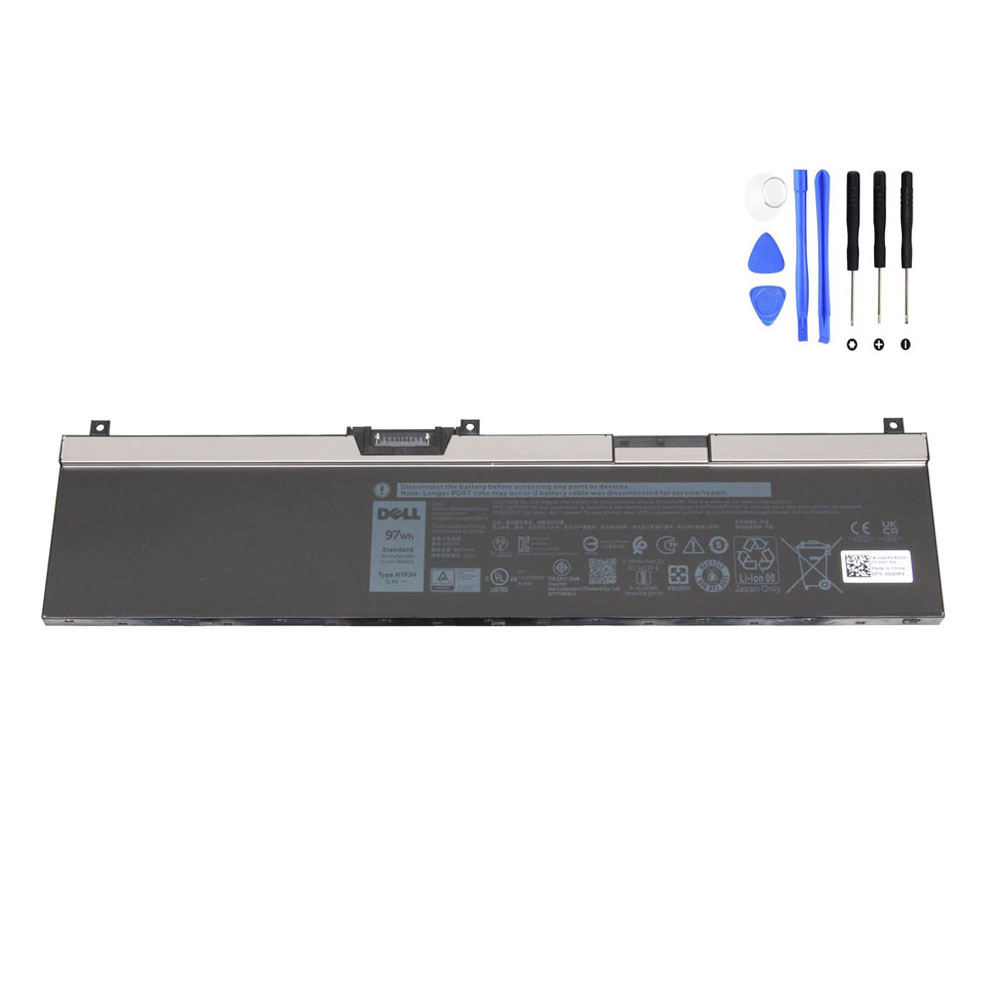
View the 97Wh Dell NYFJH Battery Product Page
Why Battery Identification Matters on These Dell Precision Models
The Dell Precision 7530, 7730, 7540, and 7740 are workstation-class laptops designed for engineering, CAD, 3D work, content creation, simulation, and other demanding professional tasks. Because they were built for different performance and storage configurations, Dell offered them with more than one internal battery option. That means two laptops with the same model name may not always use the same battery capacity or the same battery layout.
This is the key reason why buyers should never rely on laptop model name alone. A search such as “Dell Precision 7540 battery” may show multiple results, but not all of them will match the battery originally installed in your machine. The correct choice usually depends on what is physically inside your laptop now.
The Battery Most Buyers Are Looking For: 97Wh Dell NYFJH
The Dell NYFJH battery is a high-capacity internal replacement battery used in selected Dell Precision workstation laptops. On your product page, this battery is listed with the following specifications:
- Battery model: Dell NYFJH
- Capacity: 8070mAh / 97Wh
- Voltage: 11.5V
- Cell count: 6-cell
- Battery type: internal rechargeable replacement battery
It is also listed as compatible with the following series:
- Dell Precision 15 7530
- Dell Precision 15 7540
- Dell Precision 17 7730
- Dell Precision 17 7740
In addition, your product page lists a wide set of related part numbers, including 0CJ18V, 0DP9KT, 0FY2VW, 0GW0K9, 0NYFJH, 0VRX0J, 0WMRC, 451-BCFS, 451-BCGI, 7M0T6, CJ18V, DP9KT, FY2VW, GW0K9, NYFJH, VRX0J and others. This is useful because many buyers search by part number rather than by the NYFJH code itself.
Step 1: Check the Original Battery Label First
The most reliable way to identify the correct replacement battery is to read the label on the battery currently installed in the laptop. If the original battery is still readable, look for the following information printed directly on it:
- Battery part number, such as NYFJH
- Capacity, such as 97Wh
- Voltage, typically around 11.4V or 11.5V for this battery class
- Cell count, often shown as 6-cell
- Other Dell DP/N or compatible reference numbers
If your current battery label says NYFJH, then the identification step is simple. In that case, the most logical replacement is another NYFJH battery with matching specifications.
If your current battery does not say NYFJH, then do not assume a 97Wh pack is correct just because your laptop belongs to the Precision 7530, 7730, 7540, or 7740 family. Dell offered both lower-capacity and higher-capacity battery options for these systems, so confirmation matters.
Step 2: Confirm Whether Your Laptop Uses 64Wh or 97Wh
One of the most important reasons buyers order the wrong battery is that the Dell Precision 7530/7730/7540/7740 generation can appear with either a 64Wh battery or a 97Wh battery. This difference is not cosmetic. It affects the battery’s size, voltage class, and internal layout.
For example, Dell’s official setup and specification documentation for the Precision 7540 lists both 64Wh 4-cell and 97Wh 6-cell battery options. The same dual-option approach also appears in Dell’s published battery specifications for the Precision 7730 and Precision 7740. :contentReference[oaicite:1]{index=1}
In practical terms, this means the phrase “battery for Dell Precision 7540” is not specific enough by itself. You must identify which of the two battery classes your machine actually uses before buying.
Step 3: Understand the Physical Difference Between 64Wh and 97Wh Batteries
The 97Wh battery is physically larger than the 64Wh version. Dell’s own published battery specifications for these systems show that the 97Wh battery is substantially longer than the 64Wh battery, even though the width and thickness are similar. That size difference is one of the easiest ways to distinguish the two battery families once the base cover is removed. :contentReference[oaicite:2]{index=2}
That also explains why buyers should never order by online thumbnail photo alone. A battery may be advertised as “for Precision 7530 / 7540 / 7730 / 7740,” yet still represent a different capacity version. The external laptop model might match, but the battery shape inside the chassis might not.
When checking the battery, compare these factors carefully:
- Overall battery length
- Screw position and mounting tabs
- Battery connector position
- Cable routing path
- Printed voltage and Wh rating
Step 4: Use Part Numbers, Not Just Marketing Names
Part numbers are often more accurate than generic marketplace titles. For the 97Wh NYFJH battery, buyers may encounter multiple search patterns, including NYFJH itself and related Dell-compatible numbers shown on product listings. If your original battery label or service tag history references one of those matching codes, that is usually far more useful than relying on a broad phrase like “Dell workstation battery.”
Good battery identification usually follows this order:
- Match the original battery part number
- Match the Wh rating
- Match the voltage class
- Match the physical battery shape
- Then confirm laptop model compatibility
This order is important because laptop model compatibility by itself can be too broad, while part number plus capacity plus shape creates a much safer match.
Step 5: Check Battery Voltage Carefully
Voltage is another detail many buyers overlook. The 97Wh NYFJH battery is commonly listed around 11.4V to 11.5V, while Dell’s specification pages for the 97Wh battery option in this Precision generation show 11.4V. Your product page lists 11.5V and also notes compatibility with 11.4V, which is consistent with how replacement battery sellers often describe nominal and rounded voltage values. :contentReference[oaicite:3]{index=3}
What matters most is that the replacement battery belongs to the same designed battery family for the laptop chassis. A buyer should not treat battery voltage as a casual detail. Matching the original battery’s rated class is part of choosing the correct replacement.
Step 6: Open the Bottom Cover if There Is Any Doubt
If the old battery is no longer holding a charge, is swollen, or the label information is not visible from the outside, the safest method is to open the bottom cover and inspect the battery directly. This is especially important when the online marketplace shows both 64Wh and 97Wh options for the same Dell Precision series.
Once inside, confirm:
- The battery model printed on the label
- The Wh capacity
- The voltage rating
- The connector style
- The exact physical layout
This extra inspection step can save you from ordering the wrong part, waiting for delivery, reopening the laptop, and starting the return process.
Signs You May Need a New Battery
Many Precision owners start researching battery replacement only after the system becomes inconvenient or unreliable. Common warning signs include:
- Battery runtime has dropped dramatically
- The laptop shuts down unexpectedly when unplugged
- Charging percentage behaves abnormally
- The system only works reliably on AC power
- The battery has swollen or pushed against the bottom cover
- Battery health tools report severe wear
On a performance-focused mobile workstation, aging batteries can become noticeable faster because the system often runs under heavy CPU, GPU, and storage loads. Even when the laptop still functions, poor battery health can reduce portability and make field use much less practical.
Why a 97Wh Battery Appeals to Precision Workstation Users
For many owners of Dell Precision 7530, 7730, 7540, and 7740 systems, the 97Wh battery is attractive because these machines are designed for demanding workloads rather than light office use. CAD sessions, rendering work, simulation software, virtualization, data analysis, and professional content creation all place heavier demands on the power system than normal web browsing.
That means a correctly matched 97Wh battery can be the preferred option for users who care about longer unplugged runtime, stronger mobility during field work, and reduced dependence on power outlets during meetings, travel, workshops, or client visits.
Buying Checklist Before You Order
Before ordering a replacement battery for a Dell Precision 7530, 7730, 7540, or 7740, run through this checklist:
- Confirm the original battery model number
- Confirm whether your battery is 64Wh or 97Wh
- Match the voltage class
- Compare the battery shape with the product image
- Check the compatible part numbers
- Verify the compatible laptop series
- Inspect the old battery physically if anything is unclear
If your existing battery is labeled NYFJH, or if your laptop clearly uses the 97Wh 6-cell layout shown for this Precision generation, the replacement below is the one to review:
Final Thoughts
The most common mistake when replacing a Dell Precision battery is assuming that the laptop model name alone is enough. For the Precision 7530, 7730, 7540, and 7740 generation, that is not always true. These systems can use different battery options, and the correct replacement should be identified by part number, Wh rating, voltage, and physical shape.
If your original battery is a 97Wh Dell NYFJH, taking the time to verify that detail before ordering will help you avoid a mismatch and restore your workstation’s portability much more efficiently.