The Dell XPS 15 is known for premium build quality and strong performance—especially in high-resolution display and GPU configurations.
But like every laptop, battery life and battery health decline over time. The real question most owners ask is:
How long will the battery last before it needs replacement?
The practical answer depends on four factors: cycle count, heat, charging habits,
and workload. This guide explains what each factor really means, how to check your battery’s condition,
how to tell the difference between “normal wear” and “replace now,” and what to do when it’s time to buy a compatible replacement.
Many XPS 15 batteries remain usable for several years, but heavy daily cycling, high heat, and constant high-load work
can shorten lifespan significantly. A battery usually needs replacement when runtime becomes impractically short, percentage behavior becomes unstable,
or the battery health/capacity drops far below its original design level.
- Cycle count: what it is and why it matters
- Heat: the #1 battery lifespan killer
- Workload: why gaming/creator use ages batteries faster
- Charging habits that help (and habits that hurt)
- How to check XPS 15 battery health
- Signs your XPS 15 battery is near end-of-life
- How to extend battery lifespan on an XPS 15
- When it’s time: picking the correct replacement battery
- Where to buy a compatible replacement
- FAQ
Cycle count: what it is and why it matters
A battery cycle roughly means using a total of 100% of the battery’s capacity over time.
That could be one full 100% → 0% run, or two 50% runs, or any combination that adds up to 100%.
Heat and high-power load can age a battery even if the cycle count isn’t extremely high.
In practice, XPS 15 owners often see battery wear accelerate if they:
- Use the laptop unplugged for long stretches daily (high cycle usage)
- Do frequent “top-up” charging while also running heavy workloads
- Operate the laptop hot (warm lap use, blocked vents, dusty fans)
Heat: the #1 battery lifespan killer
Heat is one of the strongest accelerators of battery aging. The XPS 15 can run warm under load (especially with high-performance CPUs/GPUs),
and heat affects battery chemistry over time.
| Heat source | Why it matters |
|---|---|
| CPU/GPU load | Rendering, gaming, and compiling can raise internal temperatures and increase battery stress. |
| Blocked airflow | Soft surfaces (beds/sofas) reduce cooling efficiency and raise internal heat. |
| Dust buildup | Dust reduces heatsink performance, leading to higher sustained temperatures. |
| Hot environment | Using the laptop in warm rooms or direct sunlight keeps the battery warm for long periods. |
If you want your XPS 15 battery to last longer, prioritize cooling. Lower average temperature over months matters more than occasional short-term spikes.
Workload: why gaming/creator use ages batteries faster
Workload affects battery lifespan in two ways:
- Higher power draw drains the battery faster (more cycles over time)
- Higher heat speeds up chemical aging even when plugged in
Here’s a simple way to categorize battery “stress” by workload:
| Workload type | Typical battery stress level | Why |
|---|---|---|
| Office / browsing | Low | Lower power and lower heat, fewer deep discharge cycles. |
| Streaming / light creative | Medium | Moderate sustained draw; heat may increase depending on settings. |
| Gaming / 3D / video export | High | High sustained load and heat; battery and power system work harder. |
| Mobile high-load use | Very high | Running heavy tasks on battery power increases cycle depth and heat simultaneously. |
Charging habits that help (and habits that hurt)
Charging habits can either reduce wear or accelerate it. Here are practical habits that matter most:
Habits that help battery lifespan
- Avoid constant high heat while charging: don’t run heavy workloads on a soft surface while plugged in.
- Use smart charging limits when possible: if you keep the laptop plugged in most of the time, charging limits can reduce long-term stress.
- Prefer partial cycles over deep cycles: extreme full-to-empty cycles are harder on batteries over time.
Habits that shorten battery lifespan
- Gaming on battery power (high draw + heat + deep cycling)
- Keeping the laptop very hot for long periods (dusty fans, blocked vents, hot rooms)
- Ignoring early warning signs (unstable percentage, swelling, trackpad changes)
How to check XPS 15 battery health
You can evaluate battery health using a mix of software indicators and real-world behavior:
- Capacity trend: if full charge capacity is much lower than design capacity, the battery is worn.
- Runtime reality: if battery life is no longer practical for your needs, replacement is reasonable even if the laptop still “works.”
- Stability: sudden shutdowns, big percentage jumps, or inconsistent charging are stronger indicators than “short battery life” alone.
Signs your XPS 15 battery is near end-of-life
Battery wear becomes “replacement time” when you see one or more of these:
- Runtime collapse: the laptop barely lasts unplugged.
- Shutdown at 20–60%: classic sign of aging cells and unstable voltage under load.
- Battery percentage jumps: drops quickly, then sticks, then drops again.
- Only works on AC: dies immediately when unplugged.
- Physical change: trackpad click feels different, bottom cover not flush—stop using and inspect.
How to extend battery lifespan on an XPS 15
If your battery is still healthy enough, these steps can slow further aging:
- Keep it cool: clean vents, avoid soft surfaces, and maintain good airflow.
- Use appropriate charging limits: especially if you leave it plugged in most of the time.
- Reduce heat during heavy tasks: use a hard surface; consider performance settings that reduce sustained temperature.
- Avoid frequent deep discharges: when possible, recharge before hitting very low percentages.
When it’s time: picking the correct replacement battery
XPS 15 spans multiple generations and battery variants. The most reliable approach is:
- Dell Service Tag → identify the correct battery part number for your exact configuration
- Battery label → match the exact part number + Wh rating
- Photo/layout confirmation → connector position and overall shape match
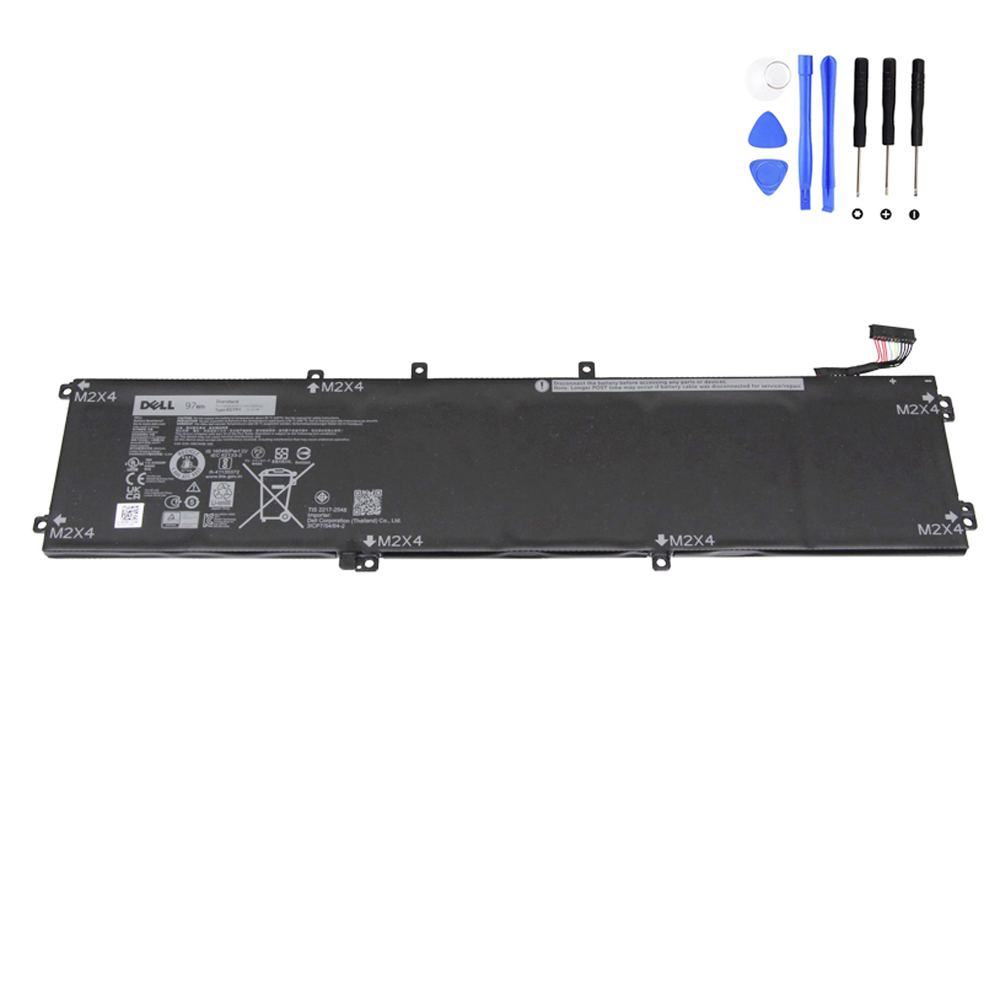
For example, if your original battery/parts lookup confirms part number 6GTPY (often in a 97Wh class pack),
use that exact identifier when selecting your replacement.
Where to buy a compatible replacement
Browse our Dell replacement batteries here:
https://fixing-tools.store/laptop-parts/product-category/battery/battery-for-dell/
If your Service Tag or battery label confirms 6GTPY, you can view the matching replacement below:
FAQ
Is cycle count the only thing that determines battery lifespan?
No. Cycle count matters, but heat and sustained high-load usage can accelerate battery aging even with moderate cycle counts.
Why do some XPS 15 batteries “wear out” faster than others?
The biggest differences are heat exposure, workload intensity, and how often the battery is deeply discharged.
A laptop used for heavy creator workloads in warm conditions typically ages a battery faster.
How do I know when replacement is worth it?
When runtime becomes impractical for your needs, or you see instability (shutdowns, jumping percentage), replacement is usually the best fix—especially if the laptop is otherwise performing well.
and are not affiliated with or endorsed by Dell Inc.