If your Dell or Alienware laptop battery no longer lasts as long as it used to, drains quickly during gaming or creative work, or shuts down unexpectedly when unplugged, the battery may be reaching the end of its useful life. On high-performance laptops, battery wear often becomes more noticeable because these machines place much heavier power demand on the system than standard office laptops.
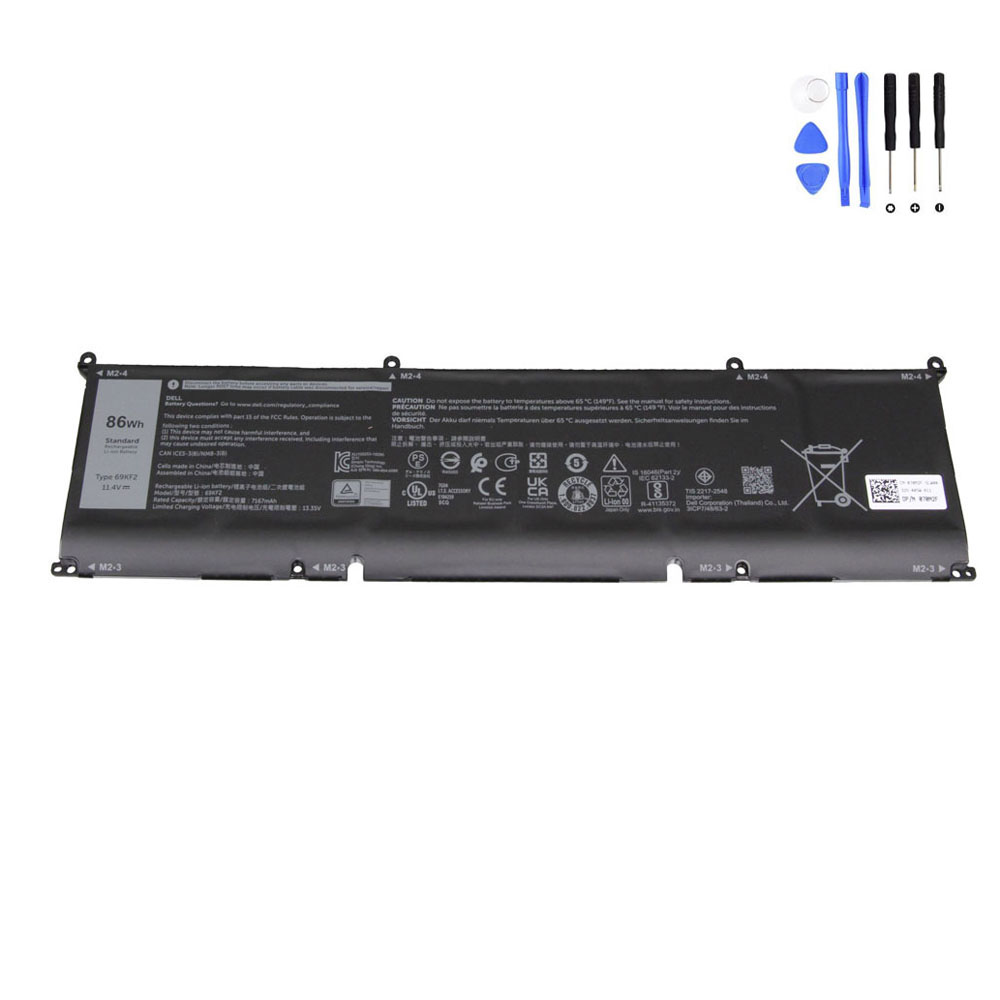
This guide focuses on the 86Wh Dell 69KF2 Battery, a 11.4V 6-cell replacement battery designed for a range of powerful Dell laptops, including selected Alienware m15/m16/m17, Dell G15/G16, XPS 15, Precision 15, Inspiron 16 Plus, and related models.
It is especially relevant for users searching by battery part numbers such as 69KF2, 70N2F, M59JH, 451-BCPR, and 451-BCQI.
View the 86Wh Dell 69KF2 Battery
Product Overview: 86Wh Dell 69KF2 Battery
Product Name: 86Wh Dell 69KF2 Battery
- Item Condition: Brand New
- Color: Black
- Capacity: 7200 mAh / 86 Wh
- Output Voltage: 11.4 Volts
- Number of Cells: 6 Cells
- Package Included: 1 x Battery for Dell
- Warranty: 12 Months / 30-Day Return
Why Users Search for the Dell 69KF2 Battery
Most buyers do not start by searching for “86Wh Dell battery.” They usually search by one of three paths:
- The exact battery part number printed on the original battery
- The laptop model, such as Alienware m15 R5 or Dell G15 5511
- A battery symptom, such as fast battery drain or poor unplugged runtime
Typical search terms include:
- Dell 69KF2 battery replacement
- Dell 70N2F battery
- Dell M59JH battery
- Alienware m15 battery replacement
- Alienware m17 battery replacement
- Dell G15 battery replacement
- Dell G16 battery replacement
- XPS 15 9500 battery replacement
- XPS 15 9510 battery replacement
- Precision 5560 battery replacement
- Dell laptop battery drains fast while gaming
That is why a part-number-based replacement article is useful. It helps buyers connect the battery code, the laptop model, and the actual symptom they are experiencing.
Compatible Part Numbers for the Dell 69KF2 Battery
If your original battery carries one of the following part numbers, this replacement is directly relevant:
- Dell 069KF2
- Dell 070N2F
- Dell 0M59JH
- Dell 451-BCPR
- Dell 451-BCQI
- Dell 69KF2
- Dell 70N2F
- Dell CN-070N2F-SLW00
- Dell CPL-70N2F
- Dell M59JH
For many Dell users, matching the original battery part number is the safest and fastest way to confirm compatibility before ordering.
Compatible Dell and Alienware Laptop Models
This 86Wh Dell 69KF2 battery is associated with a wide range of performance-focused Dell laptops, including the following model series:
Alienware Models
- Alienware m15 R3
- Alienware m15 R4
- Alienware m15 R5
- Alienware m15 R6
- Alienware m15 R7
- Alienware m16 R1
- Alienware m17 R3
- Alienware m17 R4
Dell G Series Models
- Dell G15 (5510)
- Dell G15 (5511)
- Dell G15 (5515)
- Dell G15 (5520)
- Dell G15 (5521)
- Dell G15 (5525)
- Dell G15 (5530)
- Dell G15 (5535)
- Dell G16 (7630)
Dell XPS and Precision Models
- Dell XPS 15 (9500)
- Dell XPS 15 (9510)
- Dell XPS 15 (9520)
- Dell XPS 15 (9530) DDR5
- Dell Precision 15 (5550)
- Dell Precision 15 (5560)
- Dell Precision 15 (5570)
Dell Inspiron and Vostro Models
- Dell Inspiron 15 (7510)
- Dell Inspiron 16 (5620)
- Dell Inspiron 16 2-in-1 (7630)
- Dell Inspiron 16 Plus (7610)
- Dell Inspiron 16 Plus (7620)
- Dell Inspiron 16 Plus (7630)
- Dell Vostro 15 (7510)
- Dell Vostro 16 (7620)
Important: Always confirm the original battery part number, voltage, shape, and laptop model before ordering. A battery can appear similar in photos but still differ in voltage, connector location, mounting layout, or internal fit.
Why Battery Problems Feel More Serious on Alienware and Performance Dell Laptops
Battery wear affects every laptop, but it is often more obvious on high-performance systems. That is because gaming laptops, creator laptops, and mobile workstations consume much more power during normal use than a basic office laptop.
Models like the Alienware m15 R5, Dell G15 5520, XPS 15 9520, and Precision 5560 are often used for:
- Gaming
- Video editing
- 3D rendering
- CAD work
- Multitasking with many applications open
- Long sessions on high-brightness displays
As a result, a worn battery on one of these systems becomes noticeable very quickly. Runtime may drop sharply, the laptop may feel unreliable away from the charger, and users may start to avoid unplugged use altogether.
Common Signs Your Dell 69KF2 Battery Needs Replacement
1. Battery drains very fast
This is the most common complaint. A laptop that once lasted several hours on battery may now last a much shorter time, especially during heavier workloads.
2. Battery percentage drops suddenly
If your Dell or Alienware laptop jumps from 60% to 20%, or from 25% to 5% much faster than expected, the battery may no longer be balancing its internal cells properly.
3. Laptop shuts down while still showing battery remaining
This often means the battery can no longer maintain stable voltage under real load, even though the software estimate still shows some capacity left.
4. Battery life is much worse during gaming or creative work
High-performance laptops naturally draw more power under load, but when the battery has aged, the drop in runtime becomes much steeper than before.
5. Battery no longer charges or holds full capacity properly
Some batteries begin stopping at lower charge percentages, charging inconsistently, or losing charge too quickly after reaching a high percentage.
6. The laptop becomes practically tied to the charger
If you no longer trust your laptop away from AC power, the battery may already be well past its healthy operating stage.
Model-Specific Battery Scenarios
Alienware m15 / m17 battery replacement cases
Models such as the Alienware m15 R3, m15 R4, m15 R5, m15 R6, m15 R7, m17 R3, and m17 R4 are often used for demanding workloads and gaming. Over time, users frequently notice that unplugged gaming becomes unrealistic, battery drain accelerates during light use, or the machine loses the mobility it originally offered. In many of these cases, a new battery can restore much better everyday usability.
Dell G15 and G16 battery wear
The Dell G15 series including 5510, 5511, 5515, 5520, 5521, 5525, 5530, and 5535, as well as the Dell G16 7630, are common gaming-oriented systems. Owners often report that battery life becomes disappointing after repeated charge cycles, especially when the laptop is used both for gaming and daily school or work tasks.
XPS 15 battery replacement needs
Creative and premium productivity machines such as the XPS 15 9500, 9510, 9520, and 9530 DDR5 often see heavy battery use in editing, design work, and travel. When the battery ages, these laptops lose one of their biggest advantages: powerful performance in a portable form factor.
Precision 15 battery replacement cases
For business and workstation users with the Precision 5550, 5560, or 5570, battery reliability can matter just as much as performance. If the laptop still runs well overall but battery life has become poor, replacing the battery may be more cost-effective than replacing the whole machine.
Inspiron 16 Plus and Vostro 16 battery aging
Models such as the Inspiron 16 Plus 7610/7620/7630, Inspiron 16 5620, and Vostro 16 7620 are often used as larger everyday work or creator laptops. If the laptop is still fast enough for your needs but battery runtime has dropped too much, replacing the battery can significantly improve daily convenience.
How to Tell If the Problem Is the Battery and Not the Charger
Battery problems and charger problems are often mixed up. This quick comparison helps separate them:
| Symptom | More Likely Cause |
|---|---|
| Laptop works normally on charger but runtime is poor when unplugged | Battery wear |
| Battery percentage drops abnormally fast | Battery health issue |
| Laptop shuts down unexpectedly on battery | Battery failure |
| Laptop does not respond to the charger at all | Could be charger, port, motherboard, or battery |
| System is fine when plugged in, unreliable only on battery | Usually the battery |
If your Dell or Alienware laptop behaves normally on AC power but becomes unstable or impractical only when unplugged, the battery is the first component to evaluate.
Why Battery Capacity and Class Matter on These Models
This battery is rated at 86Wh, with an output of 11.4V and a 6-cell design. That higher-capacity class is especially important for laptops that are designed for stronger performance, larger displays, or heavier workloads.
On systems like the Alienware m16 R1, Dell G16 7630, and XPS 15 family, battery size has a direct effect on how practical the laptop feels away from the desk. A worn high-capacity battery can make a powerful laptop feel far less mobile than it should.
When Replacing the Dell 69KF2 Battery Makes Sense
Replacing the battery is often worth it when:
- The laptop still performs well overall
- The only major problem is poor battery life or unstable unplugged use
- You want to keep using the laptop for gaming, study, work, travel, or creative tasks
- You want to avoid replacing an otherwise good high-end laptop too early
- You want better portability again
For many owners of Alienware, XPS, Precision, and G-series laptops, a battery replacement is far more affordable than replacing the whole machine.
Buying Tips Before Ordering a Dell 69KF2 Battery
- Match the original battery part number first
- Confirm your exact laptop model carefully
- Check that the original battery voltage is 11.4V
- Compare the shape and connector layout of the original battery
- Do not rely on appearance alone
If your original battery matches 69KF2, 70N2F, M59JH, 451-BCPR, or 451-BCQI, and your laptop is one of the supported compatible series listed above, this replacement is a much more targeted option than a generic battery listing.
Check Compatibility for the Dell 69KF2 Battery
Final Thoughts
The 86Wh Dell 69KF2 Battery is a strong replacement option for selected high-performance Dell and Alienware laptops that use this 11.4V 6-cell battery platform. If your system has become frustrating to use away from the charger, or if the battery no longer delivers reliable runtime, replacing the battery is often the most direct and cost-effective solution.
The most important step before ordering is to verify the part number, voltage, battery class, and exact laptop model. When these details match, a replacement battery can significantly extend the useful life of a powerful laptop.
FAQ
What laptops use the Dell 69KF2 battery?
The Dell 69KF2 battery is associated with selected Alienware m15/m16/m17 models, Dell G15 and G16 models, XPS 15 models, Precision 15 models, and some Inspiron 16 Plus and Vostro 16 laptops.
Is 69KF2 the same as 70N2F?
They are listed among the compatible part numbers for this battery category, which is why both numbers are useful when checking compatibility.
How do I know if my Alienware or Dell battery needs replacement?
Common signs include short battery life, fast percentage drops, unexpected shutdowns on battery, poor unplugged performance, or a battery that no longer charges and holds capacity properly.
Is this an 11.4V battery?
Yes. This battery is rated at 11.4 volts, 86Wh, and uses a 6-cell design.
Is it worth replacing the battery on an XPS 15 or Alienware laptop?
If the laptop still performs well overall and the main issue is poor battery life, replacing the battery is often much more cost-effective than replacing the entire laptop.
Should I match the battery by laptop model or part number?
The best method is to match both. Start with the original battery part number, then confirm the exact laptop model and voltage before ordering.