If your Dell laptop battery no longer holds a useful charge, drops from 40% to 5% too quickly, shuts down unexpectedly, or shows shorter runtime than before, the battery itself may be the real problem. For many Dell users, replacing the battery is one of the most effective ways to restore portability, improve daily usability, and avoid constant dependence on the charger.
This guide focuses on the 53Wh Dell H5CKD Battery, a 15V 4-cell replacement battery designed for selected Dell Inspiron and Dell Latitude laptops. It is especially relevant for users searching by battery part numbers such as H5CKD, TXD03, 7T8CD, 9077G, and 451-BCPS.
Whether you are trying to confirm compatibility, understand battery symptoms, or decide whether your Dell battery needs replacement, this article will help you make a more accurate decision.
View the 53Wh Dell H5CKD Battery
Product Overview: 53Wh Dell H5CKD Battery
Product Name: 53Wh Dell H5CKD Battery
- Item Condition: Brand New
- Color: Black
- Capacity: 3360 mAh / 53 Wh
- Output Voltage: 15 Volts
- Number of Cells: 4 Cells
- Package Included: 1 x Battery for Dell
- Important Note: 15V 4-cell battery with a longer battery design
- Warranty: 12 Months / 30-Day Return
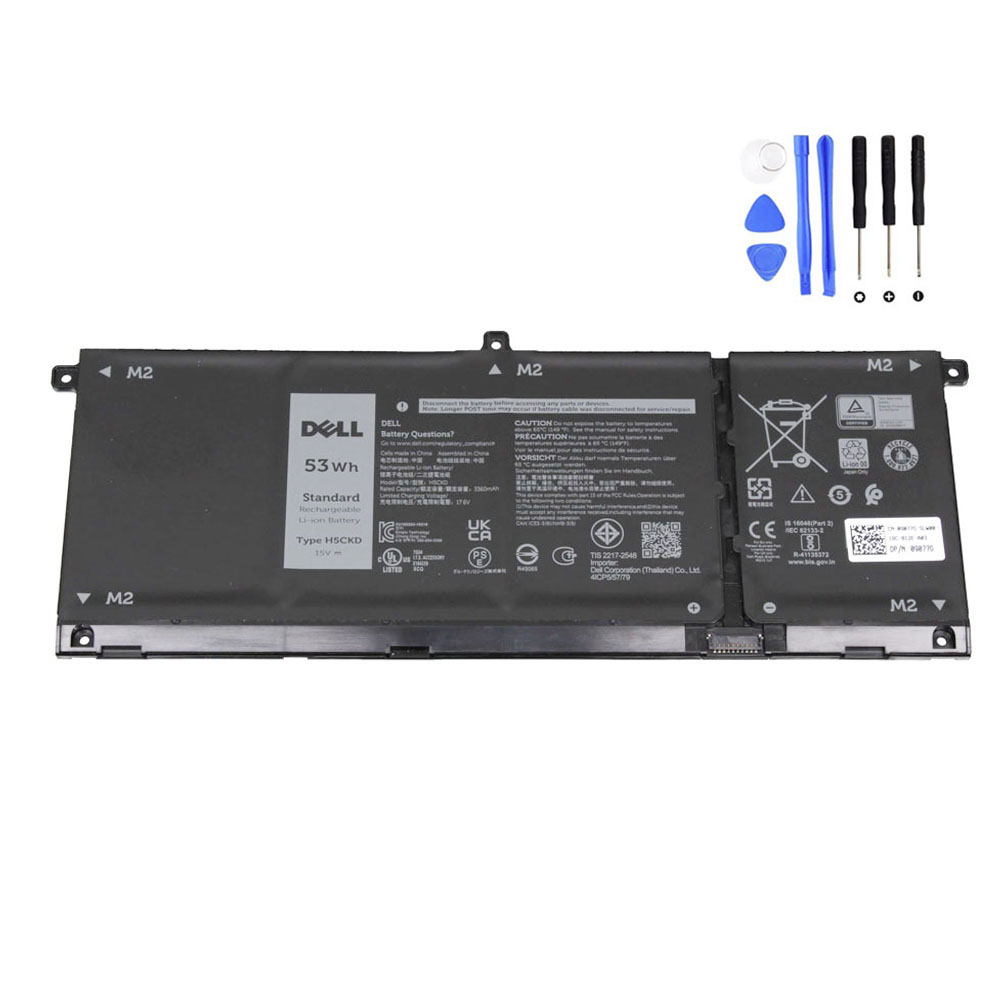

Why Dell Laptop Users Search for the H5CKD Battery
Many users do not begin by searching for “53Wh Dell battery.” Instead, they search by the exact battery code printed on the original pack, or by a laptop symptom.
Common search paths include:
- Dell H5CKD battery replacement
- Dell TXD03 battery
- Dell 451-BCPS battery
- Dell Inspiron 5502 battery replacement
- Dell Inspiron 7306 battery not holding charge
- Dell Latitude 3410 battery replacement
- Dell Latitude 3510 battery not charging
- Dell battery drains fast after a year
This is why compatibility information matters so much. A battery can look similar physically, but the voltage, connector position, internal shape, and design length must still match the original battery type.
Compatible Part Numbers for the Dell H5CKD Battery
If your original Dell battery carries one of the following part numbers, this replacement is highly relevant:
- Dell 07T8CD
- Dell 09077G
- Dell 0H5CKD
- Dell 0TXD03
- Dell 451-BCPS
- Dell 7T8CD
- Dell 9077G
- Dell H5CKD
- Dell O7T8CD
- Dell O9077G
- Dell OH5CKD
- Dell OTXD03
- Dell TXD03
For many buyers, matching the battery part number is the fastest and most reliable way to confirm compatibility before ordering.
Compatible Dell Laptop Models and Series
This 53Wh Dell H5CKD battery is associated with a number of Dell Inspiron and Latitude models, including the following laptop series:
Dell Inspiron Models
- Dell Inspiron 13 2-in-1 (7300)
- Dell Inspiron 13 2-in-1 (7306)
- Dell Inspiron 14 (5400) 2-in-1
- Dell Inspiron 14 (5401)
- Dell Inspiron 14 (5402)
- Dell Inspiron 14 2-in-1 (7405)
- Dell Inspiron 15 (5501)
- Dell Inspiron 15 (5502)
- Dell Inspiron 15 (5505)
- Dell Inspiron 15 2-in-1 (7506)
Dell Latitude Models
- Dell Latitude 11 (3120)
- Dell Latitude 11 2-in-1 (3120)
- Dell Latitude 14 (3410)
- Dell Latitude 15 (3510)
Important: Please compare your original battery part number, voltage, shape, and laptop model before purchase. This battery is a 15V 4-cell design, and the product note specifically highlights its longer design, which is important during replacement selection.
Common Signs Your Dell H5CKD Battery Needs Replacement
Battery failure is not always sudden. In many Dell laptops, battery wear happens gradually over months or years. Users often notice one or more of the following problems before the battery completely fails:
1. Battery drains much faster than before
A Dell laptop that once lasted several hours may now last only one hour, or even less. This is one of the most common signs of battery aging.
2. Battery percentage drops suddenly
For example, the battery may fall from 50% to 20% in a short time, or jump from 20% to 5% unexpectedly. This usually means battery calibration and internal cell balance are no longer healthy.
3. The laptop shuts down before reaching 0%
If your Dell laptop turns off while Windows still shows battery percentage remaining, the battery may no longer be delivering stable voltage under load.
4. Plugged in all the time, but runtime is very poor after unplugging
This often means the battery has degraded and is no longer storing energy effectively.
5. Battery not charging to full capacity
Some failing batteries stop at a lower percentage, charge unusually slowly, or appear full but discharge too quickly afterward.
6. Swelling or physical pressure inside the laptop
If the palm rest lifts, the bottom cover bulges, or the touchpad feels tight or difficult to click, stop using the laptop on battery until the battery is inspected. Battery swelling should never be ignored.
Why the Correct Voltage and Design Matter
One of the most important details for this battery is that it is a 15V 4-cell battery. Not every Dell battery with a similar shape or connector is interchangeable. Even if two batteries look similar in photos, a mismatch in voltage, size, mounting layout, or battery length can cause installation problems or compatibility failure.
This is especially important for buyers who search by laptop model only. Within the same Inspiron or Latitude family, different sub-models may use different batteries depending on configuration and production batch.
That is why the safest match method is:
- Check the original battery part number
- Confirm the laptop model
- Confirm the voltage is 15V
- Compare the battery shape and longer design style
Model-Specific Battery Scenarios
Dell Inspiron 13 2-in-1 (7300 / 7306) battery issues
These compact convertible models are often used for school, mobile work, and travel. Because they are used unplugged more often than desk-based laptops, battery wear becomes noticeable sooner. Users commonly report short runtime, rapid drain during video calls, and reduced battery life after one to two years of daily use.
Dell Inspiron 14 (5401 / 5402 / 7405) battery replacement cases
These systems are popular mainstream laptops. Battery complaints often begin with “the laptop still works fine, but the battery life has become terrible.” In many cases, replacing the battery is enough to restore normal everyday mobility.
Dell Inspiron 15 (5501 / 5502 / 5505 / 7506) battery symptoms
On these larger Inspiron models, users often notice that the laptop becomes more dependent on the charger over time. A battery that once supported work sessions away from the desk may end up lasting only a short period. If your laptop runs normally on AC power but not on battery, the battery is usually the first part to evaluate.
Dell Latitude 3410 and Latitude 3510 battery wear
Business laptops such as the Latitude 3410 and Latitude 3510 are often used for long office hours and frequent charging cycles. Over time, these cycles reduce effective capacity. If your Latitude has become unreliable during meetings, travel, or field work, replacing the battery can make the machine much more practical again.
How to Confirm You Need a New Battery and Not a New Charger
Battery and charger problems are often confused. Here is a quick way to separate them:
| Symptom | More Likely Cause |
|---|---|
| Laptop works normally when plugged in, but battery runtime is very short | Battery wear |
| Laptop shuts down suddenly on battery, but works on charger | Battery failure |
| Battery percentage jumps or drops abnormally | Battery health issue |
| Laptop does not respond to charger at all | Could be charger, port, motherboard, or battery |
| Battery not detected in BIOS or Windows | Battery connection or battery failure |
If the laptop operates normally from the charger but becomes unreliable only when unplugged, that strongly points to the battery rather than the adapter.
When Replacing the Dell H5CKD Battery Makes Sense
Replacing the battery is often worth it when:
- The laptop still performs well overall
- The screen, keyboard, and motherboard are in good condition
- The only major problem is poor battery life
- You want to keep using the laptop for school, work, or travel
- You want to avoid replacing the whole laptop too early
For many users, a battery replacement is much more cost-effective than buying a completely new laptop, especially if the machine still meets their performance needs.
Buying Tips Before Ordering a Dell H5CKD Battery
- Match the original battery part number first
- Confirm the laptop model number carefully
- Check that the battery voltage is 15V
- Pay attention to the longer battery design noted in the product description
- Do not rely only on visual similarity
If your original battery matches H5CKD, TXD03, 7T8CD, 9077G, or 451-BCPS, and your laptop model is one of the listed compatible series, this battery is a much more targeted replacement choice.
Check Compatibility for the Dell H5CKD Battery
Final Thoughts
The 53Wh Dell H5CKD Battery is a practical replacement option for selected Dell Inspiron and Latitude laptops that use a 15V 4-cell internal battery. If your Dell laptop has become difficult to use away from the charger, loses charge too quickly, or shows classic battery aging symptoms, replacing the battery is often the most direct way to restore mobility.
The most important step before ordering is to verify the battery part number, voltage, design style, and exact laptop model. Done correctly, a replacement battery can give an otherwise good laptop a much longer useful life.
FAQ
What laptops use the Dell H5CKD battery?
The Dell H5CKD battery is associated with selected Dell Inspiron and Latitude models, including Inspiron 13 2-in-1 (7300/7306), Inspiron 14 (5401/5402), Inspiron 15 (5501/5502/5505), Latitude 3410, and Latitude 3510.
Is H5CKD the same as TXD03?
They are listed among the compatible part numbers for this replacement category, which is why both part numbers are important when checking compatibility.
How do I know if my Dell battery needs replacement?
Common signs include very short battery life, sudden percentage drops, unexpected shutdowns on battery, charging abnormalities, or visible battery swelling.
Is this a 3-cell or 4-cell Dell battery?
This is a 4-cell battery with a rated capacity of 53Wh and an output voltage of 15V.
Why is the battery design note important?
The product specifically notes that this is a longer 15V battery design. That means buyers should compare the physical design and original part number carefully before ordering.
Can I choose a battery by laptop model alone?
It is better to match both the laptop model and the original battery part number. Some Dell model families may use different battery versions depending on exact configuration.