
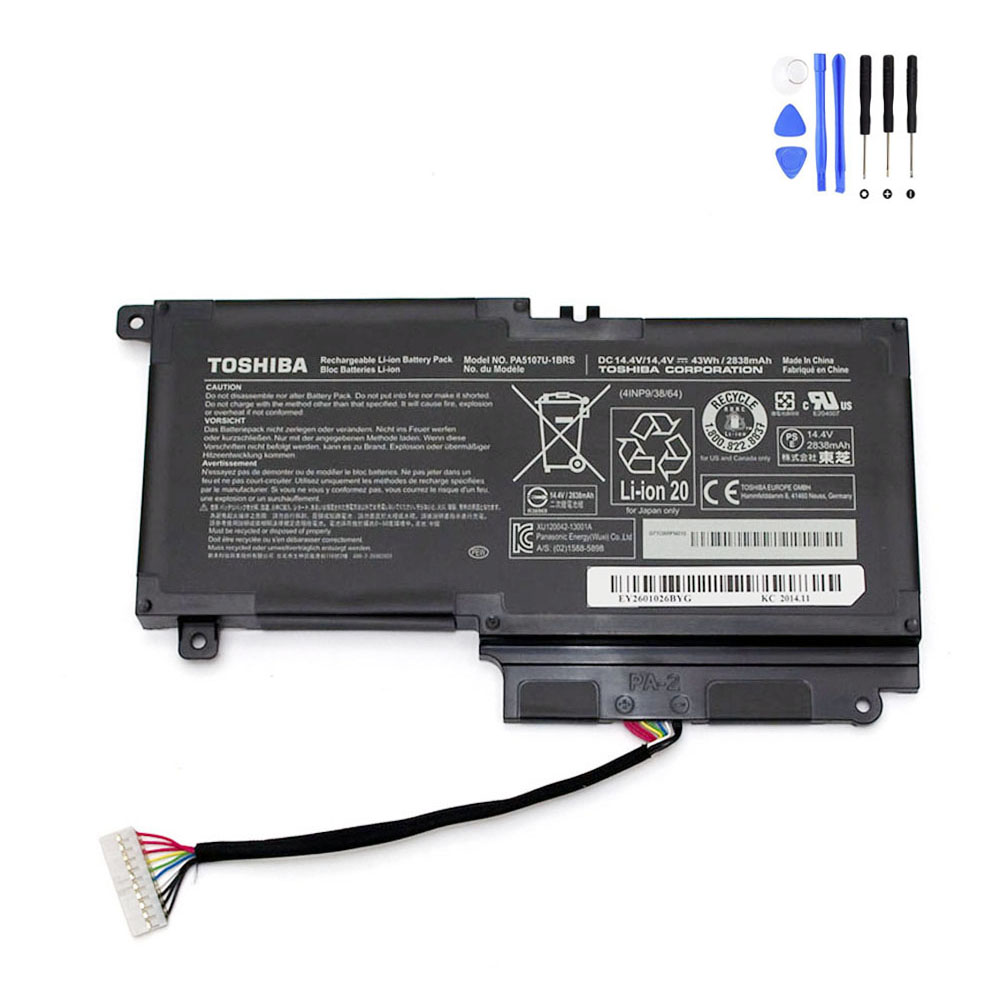
Description
Product Information
- Item Condition: Brand New
- Color: Black
- Capacity: 2838 mAh / 43 Wh
- Output Voltage (Volts): 14.4 Volts
- Number of Cells:4 Cells
- Package Included: 1 x Battery for Toshiba
- Warranty: 12 Months / 30-Day Return
Compatible Part Numbers (not all):
Toshiba PA5107U-1BRS,Toshiba G71C000FM210,Toshiba P000573230,Toshiba P000573240,Toshiba P000573250,Toshiba P000581700,Toshiba P000599500,Toshiba P000614010,Toshiba P000617510,Toshiba P000617520,Toshiba P000697220,Toshiba P71C000FM2AA,Toshiba P71C000FP3AA
Compatible Model Series (partial list):
Toshiba Satellite L40T-A,Toshiba Satellite L50-A,Toshiba Satellite L50,Toshiba Satellite L50-C,Toshiba Satellite L50D-10F,Toshiba Satellite L50D-A,Toshiba Satellite L50DT-A,Toshiba Satellite L50T-A,Toshiba Satellite L50T,Toshiba Satellite P50-A,Toshiba Satellite P50-B,Toshiba Satellite P50T-A,Toshiba Satellite P50T-B,Toshiba Satellite Pro L50-A,Toshiba Satellite Pro L50-A-126,Toshiba Satellite Pro L50-A-12L,Toshiba Satellite Pro L50-A-12Q,Toshiba Satellite Pro L50-A-133,Toshiba Satellite Pro L50-A-13T,Toshiba Satellite S50-A,Toshiba Satellite S50D-A,Toshiba Satellite S50T-A,Toshiba Satellite S55t
Reliable Power for Toshiba Satellite L50, P50 & S50 Series
Restore your laptop’s mobility with our PA5107U-1BRS replacement battery. Engineered to match the technical specifications of your Toshiba Satellite and Satellite Pro devices, this 43Wh battery ensures a consistent 14.4V output and a seamless physical fit.
Technical Specifications
| Part Number | PA5107U-1BRS |
| Voltage | 14.4 Volts |
| Capacity | 2838 mAh / 43 Wh |
| Battery Chemistry | Lithium-ion (4-Cell) |
| Condition | Brand New |
| Warranty | 12 Months / 30-Day Return |
Compatibility Checker
To ensure a correct purchase, please cross-check your original battery’s Part Number or your Laptop Model in the lists below.
Compatible Part Numbers:
PA5107U-1BRS | G71C000FM210 | P000573230 | P000573240 | P000573250 | P000581700 | P000599500 | P000614010 | P000617510 | P000697220
Compatible Laptop Series:
- Satellite L40T-A / L50-A / L50-C
- Satellite L50D-A / L50DT-A
- Satellite P50-A / P50-B
- Satellite P50T-A / P50T-B
- Satellite S50-A / S50D-A
- Satellite S50T-A / S55t
- Satellite Pro L50-A Series
Battery Care & Optimization
- Initial Calibration: Upon installation, charge the new battery to 100%. Discharge it to 10% and then recharge to 100% for 2-3 cycles to sync the software with the hardware.
- Daily Use: Avoid draining the battery to 0% as this can damage the lithium cells. Recharging when the battery reaches 15-20% is recommended.
- Safe Storage: If the laptop is not used for a long period, keep the battery at about 50% charge in a cool, dry place.
Frequently Asked Questions
Q: How do I know if this battery is the right one for my Satellite L50?
A: The best way is to remove your current battery and check for the code PA5107U-1BRS. If it matches, this battery is compatible regardless of the specific laptop sub-model.
Q: Is it difficult to install this battery?
A: For most Satellite L50/P50/S50 models, this is an external battery that clicks into place via a sliding latch on the bottom. It can be replaced in seconds without tools.
Q: What should I do if the battery is not charging?
A: First, ensure the battery is seated firmly. If it still won’t charge, try a “Power Reset”: Unplug the charger, remove the battery, hold the power button for 30 seconds, then reassemble and try again.


Reviews
There are no reviews yet